
Meta Description:
Learn Snowflake’s unique architecture — from storage to compute — and discover how its cloud-native design powers scalable, secure, and cost-efficient analytics.

Introduction
In today’s data-driven world, businesses generate massive volumes of data every second. Traditional data warehouses often struggle to keep up with the scalability, speed, and flexibility modern analytics demand. Enter Snowflake, a revolutionary cloud data warehouse built to overcome these limitations.
What sets Snowflake architecture apart is its unique design that separates storage, compute, and services — allowing organizations to analyze data faster, scale resources seamlessly, and pay only for what they use.
In this guide, we’ll simplify Snowflake’s architecture, walking you step-by-step through its three key layers: Storage, Compute, and Services. By the end, you’ll understand how Snowflake works under the hood and why it’s a preferred choice for businesses worldwide.
Why Snowflake Architecture is Unique
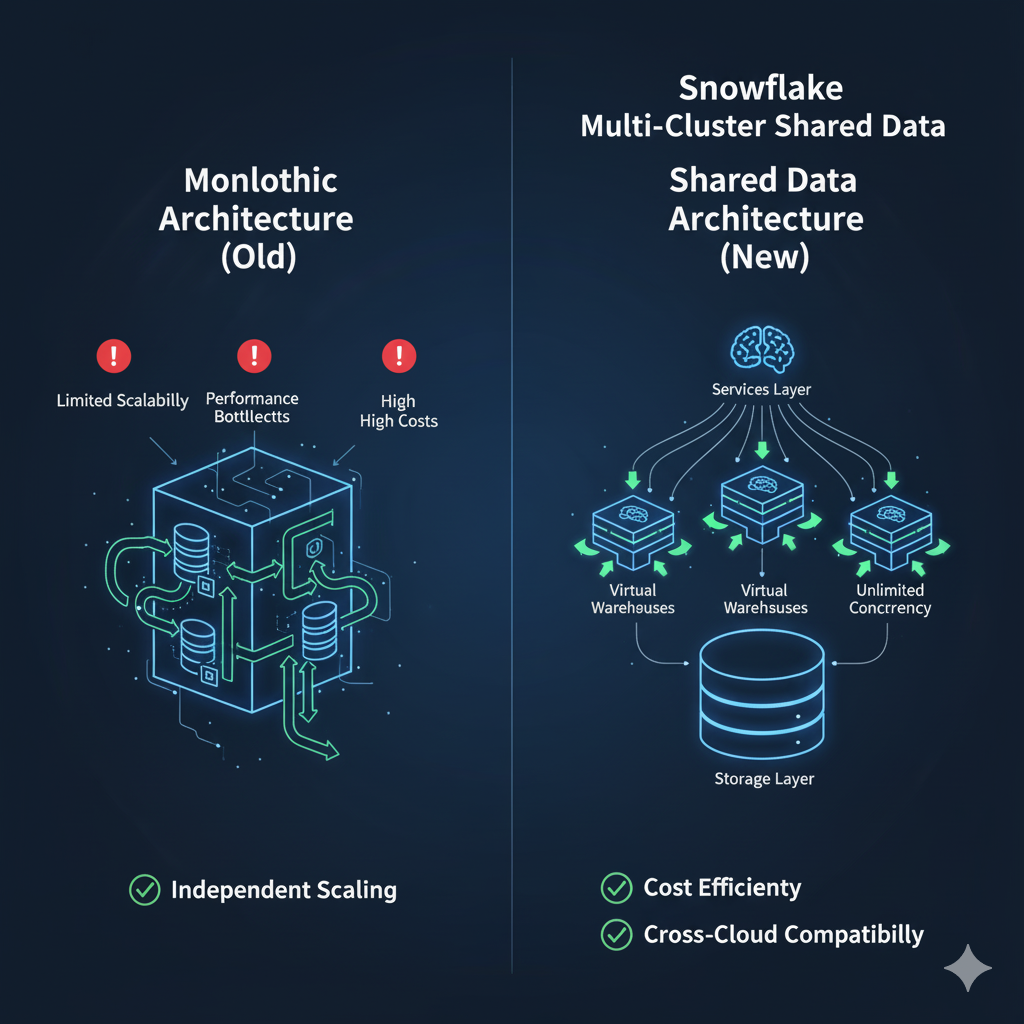
Before Snowflake, most data warehouses followed a monolithic architecture where storage and compute were tightly coupled. This created multiple challenges:
- Limited scalability: Adding more data required buying more hardware.
- Performance bottlenecks: Multiple users running heavy queries slowed everything down.
- High costs: Paying for peak capacity, even during low-usage periods.
Snowflake solved these problems by introducing a multi-cluster, shared data architecture designed for the cloud.
Key Benefits of Snowflake Architecture:
- Separation of storage and compute → scale each independently.
- Unlimited concurrency → multiple teams can query the same data without interference.
- Cost efficiency → pay only for the storage and compute you use.
- Cross-cloud compatibility → works seamlessly across AWS, Azure, and Google Cloud.
Think of Snowflake as a high-speed train where the tracks (storage), engines (compute), and control center (services) operate independently but in perfect harmony.
Core Layers of Snowflake
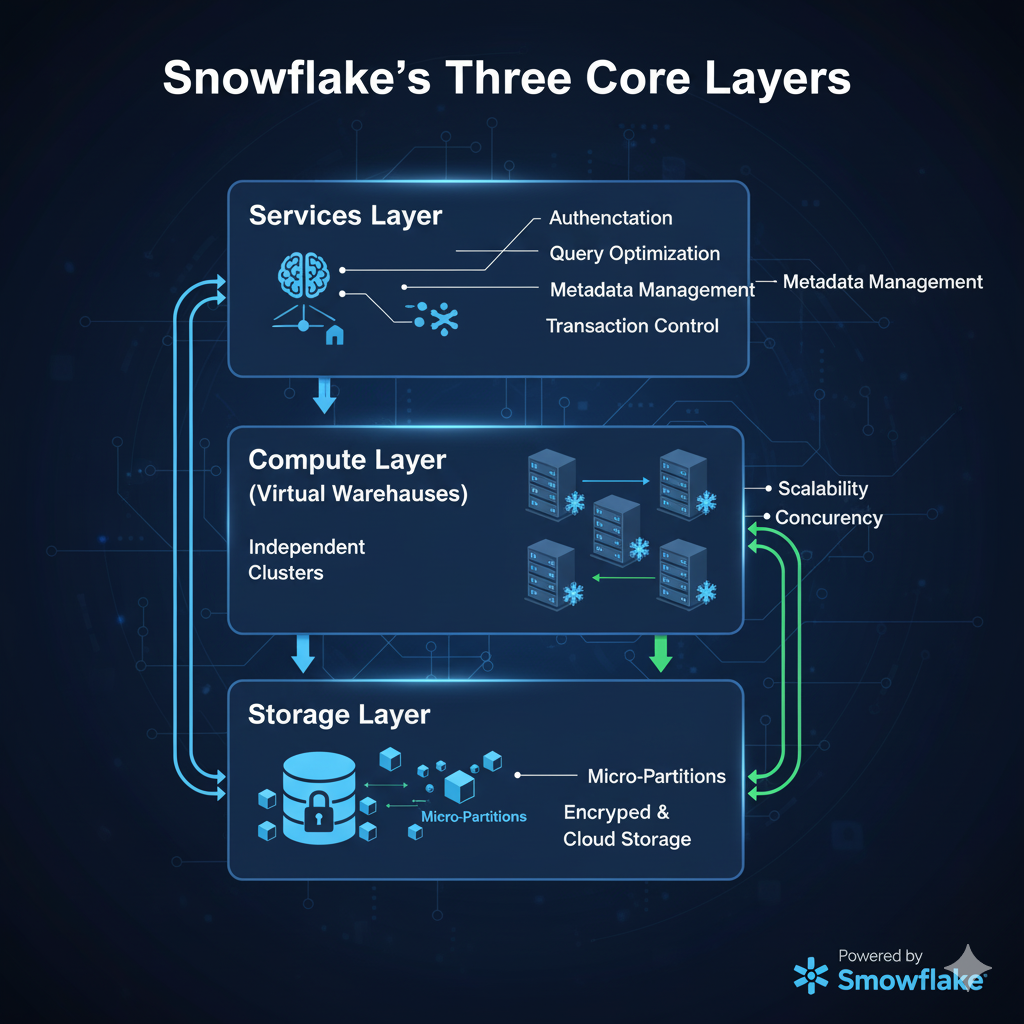
Snowflake is built on three core layers, each serving a specialized purpose but designed to work together efficiently.
1. Snowflake Storage Layer
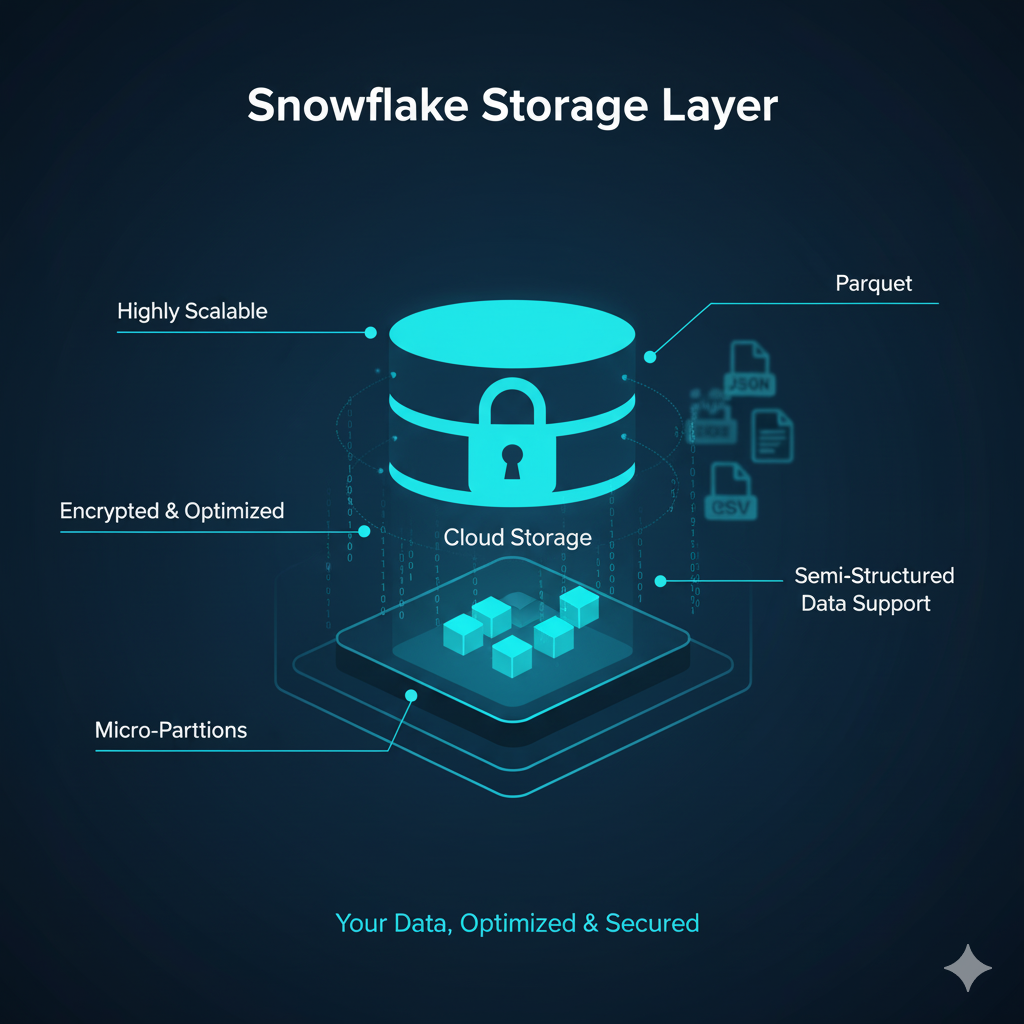
The storage layer is where all your structured and semi-structured data (like JSON, Parquet, and Avro) lives.
Snowflake automatically organizes data into compressed micro-partitions, making it faster to access and cheaper to store.
How it works:
- Data is ingested into Snowflake through pipelines or external sources.
- Snowflake automatically optimizes and encrypts this data.
- Metadata about the data is maintained for quick retrieval.
Benefits of the storage layer:
- Highly scalable storage — grows as your data grows.
- Built-in security and encryption.
- Separation from compute ensures no performance interference.
2. Snowflake Compute Layer
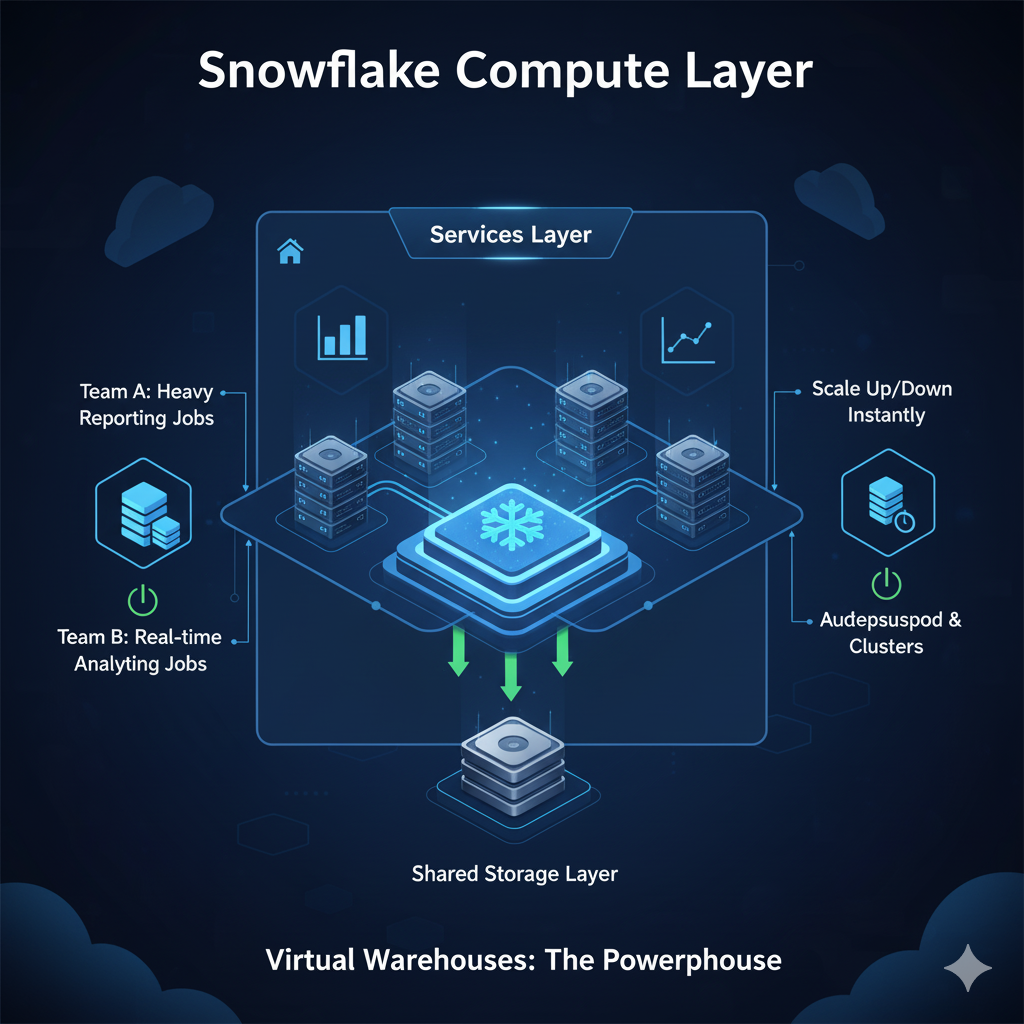
The compute layer is powered by Virtual Warehouses, which are independent clusters of compute resources used for running queries and processing data.
Key features of Virtual Warehouses:
- Scale up or down instantly based on workload.
- Auto-suspend and resume to save costs during inactivity.
- Create multiple warehouses to allow different teams to work simultaneously without resource conflicts.
Example Use Case:
Imagine a retail company:
- Team A runs heavy reporting jobs in a large warehouse.
- Team B runs real-time analytics in a smaller warehouse.
- Both teams access the same storage layer, but their compute resources never interfere.
3. Snowflake Services Layer

The services layer is like Snowflake’s brain, coordinating and optimizing everything happening across storage and compute.
Core responsibilities include:
- Authentication & security management.
- Query optimization for faster performance.
- Metadata handling — tracking data lineage, statistics, and access patterns.
- Transaction management to ensure data consistency.
Think of the services layer as an air traffic controller — ensuring smooth and safe operations between all the moving parts.
How These Layers Work Together
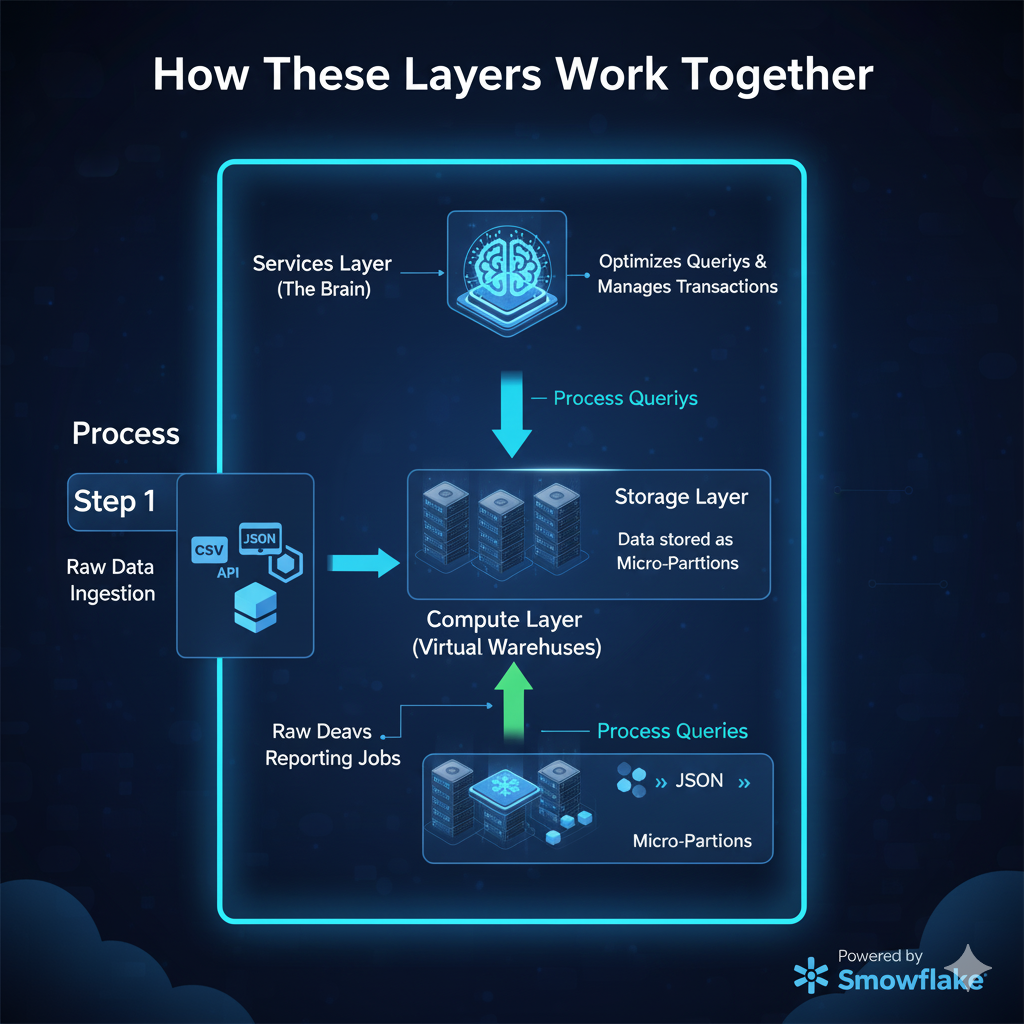
Here’s a step-by-step example of how data flows through Snowflake’s architecture:
| Step | Process | Snowflake Layer |
|---|---|---|
| 1 | Raw data is ingested from external sources (e.g., CSV, JSON, APIs). | Storage |
| 2 | Data is securely stored in micro-partitions. | Storage |
| 3 | A Virtual Warehouse spins up to process queries. | Compute |
| 4 | Services layer optimizes queries and manages transactions. | Services |
| 5 | Users get real-time analytics results. | Output |
This clear separation of responsibilities enables Snowflake to deliver unmatched speed, scalability, and reliability.
Real-World Example: Snowflake in Retail Analytics
A global retail chain uses Snowflake to handle billions of daily transactions.
- Storage Layer: Holds historical sales, customer profiles, and product inventory data.
- Compute Layer:
- Marketing runs customer segmentation models.
- Finance runs end-of-day revenue reports simultaneously.
- Services Layer: Manages query optimization and ensures that marketing queries don’t slow down finance operations.
Result:
- 50% reduction in reporting time.
- Seamless scaling during holiday season spikes.
- Significant cost savings by auto-suspending idle warehouses.
Advantages of Snowflake Architecture
| Advantage | How Snowflake Delivers It |
|---|---|
| Scalability | Independently scale compute and storage as needed. |
| Performance | Query optimization and result caching. |
| Concurrency | Multiple teams query data simultaneously without conflicts. |
| Cost Optimization | Pay only for resources used, with auto-suspend features. |
| Cross-Cloud Flexibility | Works seamlessly on AWS, Azure, and GCP. |
Conclusion & Call to Action
Snowflake’s innovative architecture — with its separation of storage, compute, and services — has redefined what’s possible in modern data warehousing. By embracing this cloud-native model, businesses can achieve unlimited scalability, high performance, and cost efficiency like never before.
Whether you’re just starting your Snowflake journey or looking to optimize your existing setup, understanding the architecture is your first step toward data-driven success.
FAQs
1. How does Snowflake separate storage and compute?
Snowflake uses independent layers for storage and compute. Data stays in the storage layer, while compute resources (Virtual Warehouses) process queries. This ensures performance and scalability without interference.
2. Is Snowflake a cloud data warehouse?
Yes, Snowflake is a fully managed cloud-native data warehouse that runs on AWS, Azure, and Google Cloud.
3. Can Snowflake handle both structured and semi-structured data?
Absolutely. Snowflake supports structured data like tables and semi-structured formats such as JSON, Avro, ORC, and Parquet.