Snowflake Table Properties Explained: Syntax, Persistence, Time Travel, Fail-Safe, Cloning & View Rules
Snowflake offers multiple table types—Permanent, Transient, Temporary, and External—each designed for specific workload patterns, cost models, and data-protection rules. Understanding how these table types differ is a foundational skill for any data engineer, Snowflake architect, or SnowPro Core aspirant.
In this article, we break down core table properties such as syntax, persistence behavior, time-travel retention, fail-safe, cloning rules, and view creation—using insights from Snowflake documentation and the uploaded study material.
You’ll also find a comparison table, clear explanations, practical guidance, and best-practice usage recommendations.
1. Snowflake Table Properties Comparison
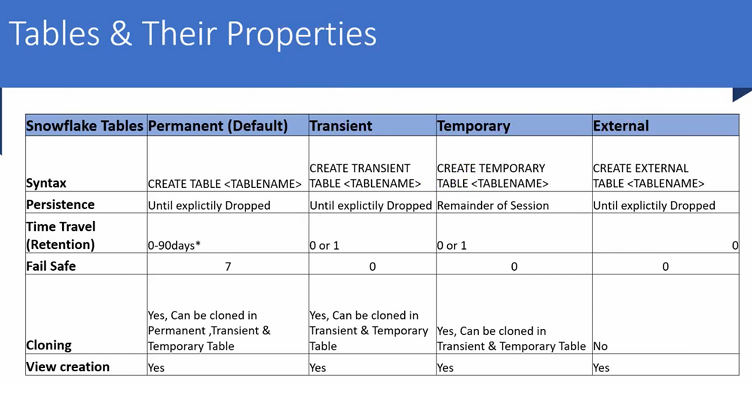
Snowflake table types & their properties overview
The table compares the four major table categories and clarifies how each behaves across six key dimensions: Syntax, Persistence, Time Travel, Fail-Safe, Cloning, and View creation. The text below recreates and expands on the concepts.
1.1 Syntax Differences
Every table type has its own CREATE TABLE command:
- Permanent (default) →
CREATE TABLE <name> - Transient →
CREATE TRANSIENT TABLE <name> - Temporary →
CREATE TEMPORARY TABLE <name> - External →
CREATE EXTERNAL TABLE <name>
Snowflake derives the table type strictly from the keyword used while creating it.
No keyword → Permanent table (default).
1.2 Persistence Behavior
Persistence refers to how long Snowflake keeps the data before deletion.
| Table Type | Persistence Behavior |
|---|---|
| Permanent | Data stays until explicitly dropped. |
| Transient | Data persists until dropped; optimized for lower-cost storage and no fail-safe. |
| Temporary | Data persists only for the current session; Snowflake deletes it automatically. |
| External | Data persists outside Snowflake in cloud storage (S3, Azure, GCS). |
All summaries match the source PDF table and Snowflake docs.
1.3 Time Travel (Data Retention)
Time Travel lets you recover dropped tables or query historical data.
| Table Type | Retention Duration |
|---|---|
| Permanent | Up to 90 days (0–90 depending on account type). |
| Transient | 1 day (fixed; cannot be increased). |
| Temporary | Remainder of session (effectively 0–1 day). |
| External | No time travel (0 days). |
These values match the PDF’s retention rules.
1.4 Fail-Safe Behavior
Fail-safe is Snowflake’s extra 7-day recovery window after Time Travel expires.
| Table Type | Fail-Safe |
|---|---|
| Permanent | YES – 7 days. |
| Transient | NO. |
| Temporary | NO. |
| External | NO. |
Fail-safe exists only for Permanent tables, as highlighted in the uploaded PDF.
1.5 Cloning Rules
Zero-copy cloning works differently across table types:
| Table Type | Cloning Allowed? |
|---|---|
| Permanent | Can clone & be cloned into any table type. |
| Transient | Can clone and be cloned into transient or temporary tables. |
| Temporary | Can be cloned; clones are also temporary/transient. |
| External | Cannot be cloned. |
This matches the restrictions described in the comparison table.
1.6 View Creation Rules
All table types support view creation:
- Permanent → Views allowed
- Transient → Views allowed
- Temporary → Views allowed
- External → Views allowed
NOTE : “All types support view creation.”
2. Key Points Explained (Expanded Summary)
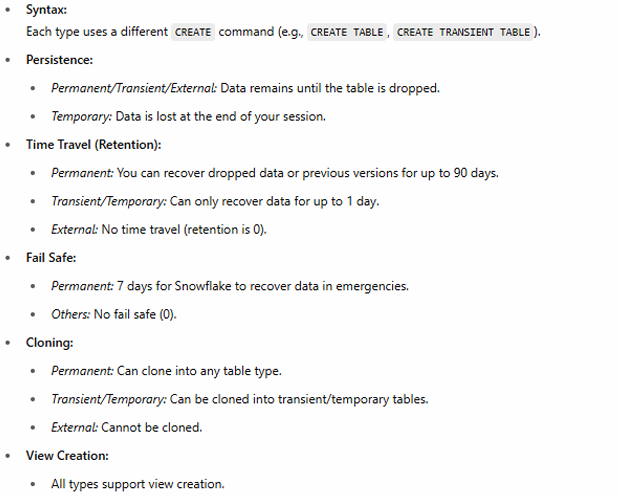
2.1 Syntax Differences
Each table type is created with a unique keyword:
- permanent → default (
CREATE TABLE) - transient → cheaper, no fail-safe (
CREATE TRANSIENT TABLE) - temporary → session-scoped (
CREATE TEMPORARY TABLE) - external → metadata-only pointer (
CREATE EXTERNAL TABLE)
Understanding syntax is important because Snowflake does not allow converting a table type later (e.g., temporary → permanent).
2.2 Persistence Behavior
- Permanent / Transient / External → Persist until explicitly dropped.
- Temporary → Exists only during the session and auto-drops.
Persistent or session-scoped behavior influences design decisions for pipelines, staging zones, and scratch environments.
2.3 Time Travel Duration
- Permanent → Up to 90 days
- Transient → 1 day
- Temporary → Remainder of the session
- External → No time travel
This is crucial for cost optimization, because Time Travel increases storage cost for historical micro-partitions.
2.4 Fail-Safe Policies
- Only Permanent tables have fail-safe (7 days).
- All other table types have fail-safe = 0.
Fail-safe is Snowflake-managed and intended for catastrophic disaster recovery, not for user operations.
2.5 Cloning Rules
Zero-copy cloning is powerful, but table type rules matter:
- Permanent → Free to clone everywhere
- Transient/Temporary → Can clone each other but not external tables
- External → Cannot be cloned (because data lives outside Snowflake)
This prevents accidental propagation of long-term data retention or fail-safe obligations.
2.6 View Creation Behavior
All table types support:
- Standard Views
- Secure Views
- Materialized Views (with limitations for External Tables)
External tables support views, but materialized views over external tables require Snowflake-managed refresh which has its own cost/performance considerations.
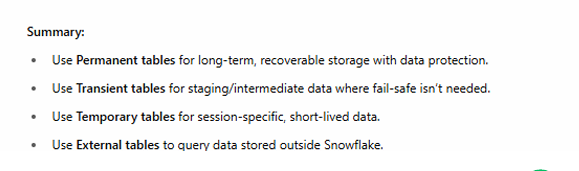
3. Summary: When to Use Which Table Type?
Use Permanent Tables When:
- You need long-term durable storage
- Compliance, audit, or production workloads demand Time Travel + Fail-safe
- You need maximum recoverability
Use Transient Tables When:
- You want lower storage cost
- Fail-safe is not required
- You’re handling intermediate ETL stages
Use Temporary Tables When:
- You need session-scoped tables
- Pipelines require scratch/work tables
- You want zero persistence outside your session
Use External Tables When:
- Data lives in S3 / Azure / GCS
- You want schema-on-read
- You want interoperability with other compute engines
Final Thoughts
Understanding table types isn’t just an exam topic—it’s a real-world Snowflake skill that affects:
- storage cost
- disaster recovery
- performance
- pipeline design
- compliance
- ease of maintenance
Mastering syntax, persistence, Time Travel, and fail-safe behavior ensures you build data systems that are resilient, cost-effective, and production-ready.
This guide blends Snowflake documentation with your uploaded training content to give you a complete, beginner-to-advanced understanding.