

🔗 https://techtown.in/power-bi/getting-data/connect-to-web-apis/
(Topic: Connect to Web APIs in Power BI)
🌐 Connect to Web APIs in Power BI – Load JSON, XML, or REST Data Seamlessly
Power BI allows you to connect to Web APIs directly using the Web connector, enabling powerful integration with external services, cloud platforms, and REST APIs.
You can pull real-time data from:
- Public APIs (e.g., weather, currency rates, GitHub)
- Internal web services
- Government data portals (JSON/XML feeds)
🧭 Steps to Connect to a Web API in Power BI
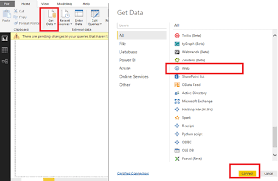
✅ Step 1: Go to Get Data → Web
- Open Power BI Desktop
- Click on Home > Get Data > Web
This opens a window asking for the URL of the web service or API endpoint.
✅ Step 2: Enter the API URL
Paste a valid API URL. Examples:
- For JSON API:
https://api.exchangerate-api.com/v4/latest/USD - For XML API:
https://www.ecb.europa.eu/stats/eurofxref/eurofxref-daily.xml
✅ Step 3: Choose Access Method (if required)
Depending on the API, you may need to authenticate:
- Anonymous (default)
- Basic Authentication (username/password)
- Web API key/token
- OAuth2 (for services like Google or Salesforce)
Power BI will prompt you if credentials are required.
✅ Step 4: Preview and Load / Transform
Once connected:
- Power BI auto-detects if the response is JSON, XML, or HTML
- You’ll see a preview of the structured data
- Click Transform Data to clean/reshape using Power Query
- Or click Load to bring the data directly into the report
🧠 Pro Tip: Transform JSON with Record/List Navigation
Most APIs return nested JSON. Use Power Query steps:
- Convert Record → Table
- Expand nested fields
- Rename or remove columns
- Change data types
This helps shape API response into flat tabular format.
🔐 Working with API Keys and Headers
Some APIs require custom headers (e.g., API key in Authorization).
You can:
- Use Advanced Editor in Power Query
- Or set headers via Web.Contents() function
Example:
let
    Source = Json.Document(Web.Contents("https://api.example.com/data",
        [Headers = [Authorization="Bearer YOUR_API_KEY"]]))
in
    Source
🧩 Combine Web APIs with Local Data
You can merge your API data with:
- Excel sheets
- SQL Server tables
- Dataverse/SharePoint
This is ideal for building live dashboards that blend internal + external data in one place.
⚡ Use Cases for Web API in Power BI
| Use Case | Example Source |
|---|---|
| Weather dashboard | OpenWeatherMap API |
| Stock market insights | Alpha Vantage / Yahoo Finance API |
| COVID-19 stats | WHO or Government data APIs (JSON/XML) |
| GitHub repo tracker | GitHub REST API |
| Crypto dashboards | CoinGecko / CoinMarketCap API |
📘 Summary
The Web connector in Power BI opens up endless integration possibilities with modern APIs. From public JSON endpoints to private enterprise REST APIs — you can connect, transform, and visualize it all.
No external tool needed. Just your URL and Power BI’s built-in power.