🔗 https://techtown.in/power-bi/getting-data/get-data-from-sql-server/
💯 Optimized to match your uploaded image (showing server & database dropdowns) and provide real value.
🛠️ Get Data from SQL Server in Power BI (Dropdown, Import Mode, SQL Query)
📌 You can easily connect Power BI Desktop to a SQL Server database to visualize live business data. The SQL Server connector supports both direct dropdown selection and custom queries.
🔽 Step-by-Step: Connect Using Server & Database Dropdowns
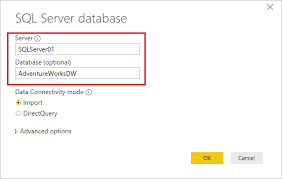
The dialog box shown above allows you to:
- Select a SQL Server instance from the Server dropdown
- Select a specific database from the Database dropdown (optional)
Power BI auto-detects available SQL Servers on your network (if discoverable), making it easier to pick from the list rather than typing manually.
⚙️ Data Connectivity Modes
| Mode | Description |
|---|---|
| ✅ Import | Loads a static copy of data into Power BI for fast performance |
| 🔄 DirectQuery | Connects live to SQL Server and fetches data on each interaction |
👉 Import is ideal for performance and offline work.
👉 DirectQuery is better for real-time dashboards with current data.
🧠 Tip: Use Import if your dataset is under a few million rows. For large/critical real-time dashboards, go for DirectQuery — but remember it may affect performance.
🧾 Optional: Use Advanced Options for SQL Queries
If you want more control, click Advanced options and paste a custom SQL statement. This lets you:
- Join multiple tables in SQL
- Apply
WHERE,GROUP BY,ORDER BY - Limit results (
TOP 1000or useROW_NUMBER()for pagination)
Example:
SELECT EMP_ID, NAME, SALARY
FROM dbo.Employees
WHERE DEPT = 'HR' AND SALARY > 50000
✅ Power BI will treat this query as a virtual table and allow you to visualize it directly.
📋 Use Case Examples
- 🔍 Sales Analytics: Connect to
SalesDB, import tables likeOrders,Products - 💼 HR Dashboards: Use a query on
EmployeeDBto fetch high-earning employees - 📦 Inventory Reports: Pull latest stock counts using DirectQuery
🧩 Merge with Other Sources
Once connected to SQL Server, you can combine it with:
- Excel files (Merge Queries)
- APIs (Web connector)
- Power Platform (Dataverse, Power BI Datasets)
This creates a powerful data model that unifies multiple sources in one place.
📘 Summary
Power BI’s SQL Server connector provides a clean and intuitive experience:
- Dropdowns for Server & Database
- Two flexible data modes (Import/DirectQuery)
- Advanced SQL query support
- Seamless integration with other data sources
It’s the best way to bridge your structured backend data into stunning, dynamic visuals.