Caching in Snowflake: The Hidden Engine Behind Performance and Cost Efficiency
Caching is one of Snowflake’s most powerful, yet least understood features. It’s what enables queries to execute in milliseconds, dashboards to refresh instantly, and workloads to scale efficiently — all while minimizing compute cost.
In Snowflake, caching works silently in the background, accelerating query performance and eliminating redundant computation. Understanding how caching works is essential for data engineers, architects, and SnowPro Core certification candidates who aim to design optimized, cost-effective data systems.
This guide explains Snowflake’s three caching layers, their behavior, lifecycle, invalidation logic, and how they contribute to performance optimization.
1️⃣ Introduction
When a user executes a query in Snowflake, it’s not always processed from scratch. Snowflake’s architecture intelligently determines whether parts of the query (or even the full result) can be retrieved from its cache layers.
These caches act as performance accelerators by:
- Reducing repetitive data scans and computation.
- Delivering instant responses for previously executed queries.
- Lowering credit consumption by skipping warehouse-level processing.
Caching plays a central role in Snowflake’s cost-efficiency model, where you only pay for compute when necessary. Mastering caching not only boosts performance but also directly supports your SnowPro Core exam preparation.
2️⃣ What is Caching in Snowflake?
Caching in Snowflake refers to its built-in mechanism for reusing previously computed data, results, and metadata to avoid redundant processing.
Instead of re-executing identical queries or reloading data from cloud storage, Snowflake retrieves results or intermediate data from its caches.
Why Caching Matters
- Performance: Queries run significantly faster.
- Cost Efficiency: Reduced warehouse compute usage equals fewer credits consumed.
- Scalability: Multiple users can execute similar queries concurrently without added load.

All caching in Snowflake is automatic and transparent — users don’t need to manage or refresh caches manually.
3️⃣ Types of Caching in Snowflake
Snowflake employs three distinct caching layers, each serving a different purpose in query performance optimization.
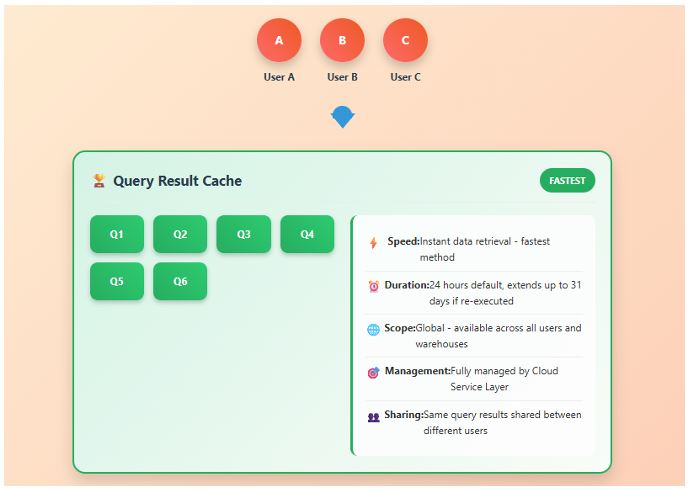
A. Query Result Cache
The Query Result Cache stores the final results of queries that have already been executed.
Purpose:
Avoids re-executing identical queries by reusing stored results.
Duration:
Results are cached for up to 24 hours, provided that:
- The underlying data has not changed.
- The same user role and identical query text are used.
Scope:
Available across users in the same account who have the same privileges and run the same query text.
How It Works:
When a query runs, Snowflake generates a query hash based on the SQL text, user role, and referenced objects.
If another identical query is submitted, Snowflake checks the hash and metadata:
- If both match, the cached result is returned instantly — no compute required.
- If not, the query executes normally, and the result is cached for future use.
Example:
If an analyst runs:
SELECT REGION, SUM(SALES)
FROM SALES_DATA
GROUP BY REGION;
and reruns the same query within 24 hours (with no data changes), Snowflake returns the result instantly.
Pro Tip:
Monitor cached query reuse through the QUERY_HISTORY view to identify repeated workloads benefiting from result caching.
Common Mistake:
Assuming all queries benefit from result cache.
If the underlying data changes, the user role differs, or parameters vary, the cache is invalidated automatically.
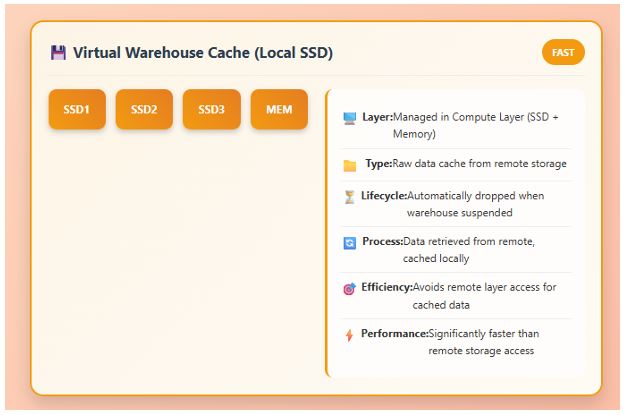
B. Virtual Warehouse Cache (Local Disk Cache)
Each Virtual Warehouse maintains a local cache on SSD-based storage. This cache stores data pages (micro-partitions) recently accessed by the warehouse during execution.
Purpose:
Speeds up queries by avoiding repeated reads from remote cloud storage.
Behavior:
- When the same or overlapping data is queried again, Snowflake retrieves it from this local cache.
- This avoids additional I/O and latency from fetching data from external cloud storage.
Persistence:
The cache is temporary — it’s cleared when the warehouse is suspended or restarted.
Example Scenario:
During an ETL process, if multiple queries read the same fact table sequentially within the same session, subsequent queries will reuse data from the local cache.
Pro Tip:
Keep warehouses active during continuous workloads (like ETL batches) to maximize cache reuse and minimize redundant reads.
Common Mistake:
Expecting cache persistence across suspended warehouses. Once a warehouse is paused, the local cache is lost, requiring data to be reloaded from storage when resumed.
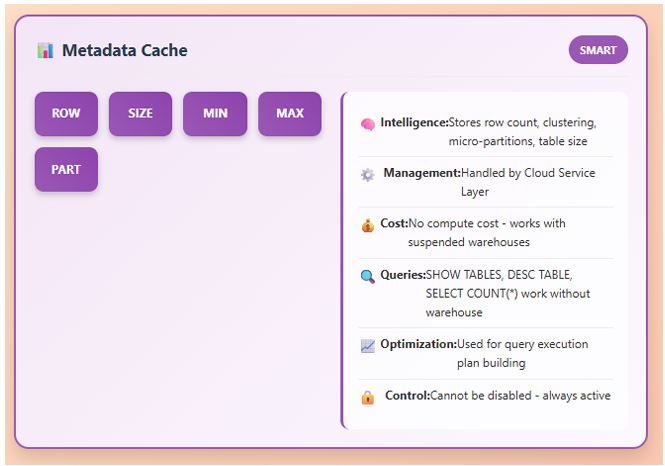
C. Metadata Cache
The Metadata Cache stores table statistics and metadata about micro-partitions — such as row counts, min/max values, and clustering information.
Purpose:
Helps the optimizer perform partition pruning and cost-based decisions without scanning unnecessary data.
Where It Lives:
Within the Cloud Services Layer, not on compute nodes.
Behavior:
- Enables faster query planning by knowing which partitions are relevant.
- Improves performance for both cached and non-cached queries.
- Does not store actual data, only metadata descriptors.
Pro Tip:
Keep statistics updated (e.g., via frequent DML or ANALYZE operations) to help the optimizer make better caching and pruning decisions.
Common Mistake:
Confusing metadata cache with query result cache — metadata speeds up planning and pruning, whereas result cache avoids full query execution.
4️⃣ How Snowflake Uses Caching During Query Execution
Caching is not an isolated process — it’s deeply integrated into Snowflake’s query execution lifecycle.
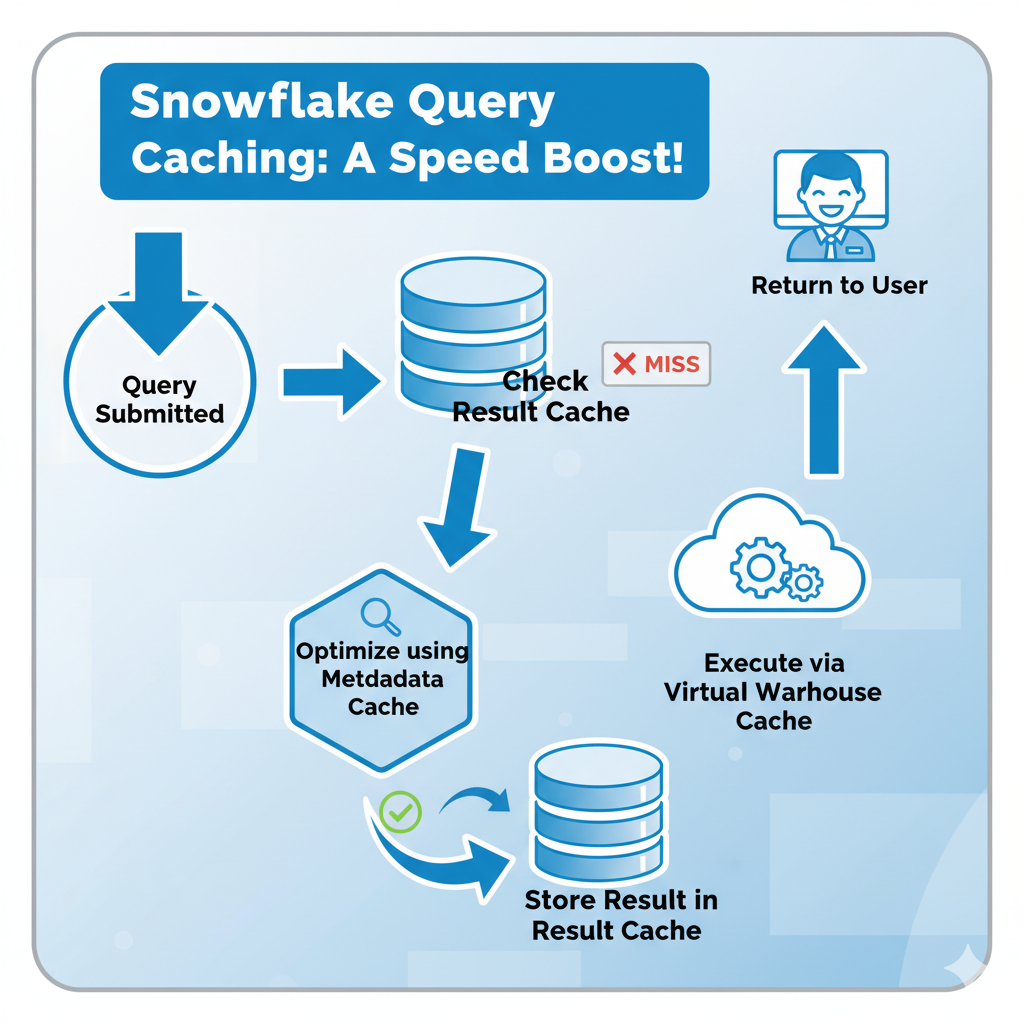
fig: Snowflake Caching During Query Execution
Step-by-Step Flow:
- Query Submitted:
A user executes SQL through Snowsight, SnowSQL, or a connected BI tool. - Check Query Result Cache:
Snowflake verifies whether an identical query was executed recently.- If found and still valid → return result instantly (no compute cost).
- If not → continue to optimization phase.
- Optimization via Metadata Cache:
The optimizer references metadata about micro-partitions to determine which partitions to scan or skip. - Execution via Virtual Warehouse:
The warehouse executes the query using compute.
If data has been accessed recently, it retrieves it from local cache instead of cloud storage. - Result Storage:
Once computed, results are stored in the Query Result Cache for future reuse.
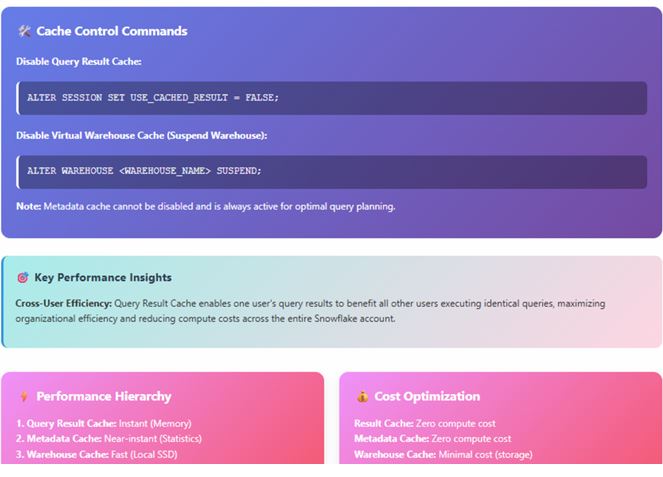
Fig: Snowflake Cache Control Commands
5️⃣ Cache Invalidation Rules
Caching in Snowflake is smart and self-maintained, but certain events invalidate specific caches.
| Cache Type | Invalidated When | Persistence |
|---|---|---|
| Query Result Cache | Data changes (INSERT, UPDATE, DELETE), query >24h old, or different user role | 24 hours (if valid) |
| Virtual Warehouse Cache | Warehouse suspended, restarted, or resized | Until warehouse suspension |
| Metadata Cache | DML operations modify metadata, warehouse restarts, or structure changes | Automatically refreshed |
Pro Tip:
For predictable workloads (like scheduled dashboards), plan query patterns to fall within the 24-hour result cache window.
Common Mistake:
Expecting cached results after data loads — new data invalidates previous results automatically.
6️⃣ Performance Impact and Cost Optimization
Snowflake caching has a direct, measurable impact on performance and credit consumption.
Key Metrics:
- Result Cache: Zero compute credits, instant retrieval (milliseconds).
- Warehouse Cache: Reduces read I/O latency and warehouse runtime.
- Metadata Cache: Reduces optimization and planning overhead.
Real-World Example:
An analytics dashboard refreshed every 10 minutes benefits heavily from caching.
After the first run, most queries hit the result cache, leading to:
- 80–90% reduction in compute cost.
- Instant query responses for users.
Credit Saving Tip:
For BI and recurring workloads, schedule refresh intervals smartly — not continuously. This keeps warehouses warm and caches effective without overconsumption.
7️⃣ Best Practices for Effective Caching
- Reuse Query Patterns: Identical SQL text and parameters maximize result cache hits.
- Consistent Roles: Ensure user roles and permissions remain consistent across executions.
- Keep Warehouses Warm: Avoid frequent suspend/resume cycles for repetitive ETL jobs.
- Analyze Query Profiles: Use Snowsight’s Query History to detect cache hits and misses.
- Understand Workload Behavior: Distinguish between analytical and transactional patterns for better caching strategy.
Pro Tip:
For high-frequency dashboards, keep a dedicated Medium-sized warehouse active during business hours to maximize cache reuse and minimize latency.
Common Mistake:
Using dynamic queries with parameter changes — these generate different query hashes and bypass result cache reuse.
8️⃣ Summary & Key Takeaways
- Snowflake uses three cache layers:
- Result Cache for reusing full query results.
- Virtual Warehouse Cache for local data reuse.
- Metadata Cache for optimized query planning.
- Caching is automatic and transparent, requiring no manual configuration.
- Understanding cache behavior is crucial for cost optimization and performance tuning.
- Mastering caching is key for SnowPro Core certification and real-world Snowflake expertise.
9️⃣ Resources
Continue learning with Query Optimization and Performance Tuning in Snowflake, where caching concepts integrate with query planning and warehouse sizing.
Recommended documentation:
Hands-on Exercise:
- Run a query twice.
- Observe cache hit in
QUERY_HISTORY. - Modify data → rerun → observe cache invalidation.
Caching in Snowflake isn’t just a performance feature — it’s an architecture principle.
By leveraging caching effectively, you can achieve lightning-fast queries, lower compute costs, and truly scalable data workloads across your Snowflake environment.