Snowflake Views: Standard, Secure, and Materialized Views Explained
Snowflake Views: Standard, Secure, and Materialized Views Explained
Snowflake supports multiple types of views that provide logical data abstraction, protect sensitive logic, and offer optimized performance for repeated analytical queries. This guide presents a complete explanation of standard views, secure views, and materialized views, along with their characteristics, usage patterns, and practical implementation examples.
Overview of Snowflake Views
A Snowflake view is a virtual table defined by a SQL query. Views simplify data access by allowing users to retrieve pre-defined query results without directly querying underlying tables. The above diagram summarizes the key differences among view types:
- Standard View: Logical representation of data with no physical storage. Underlying tables are queried dynamically, and query definitions are visible to users with access.
- Secure View: Hides query definitions from users and prevents data inference attacks. Query logic is exposed only to authorized users, offering enhanced privacy protection.
- Materialized View: Physically stores pre-computed query results. Automatically refreshes based on underlying data changes and provides significant performance gain for repeated, single-table queries.
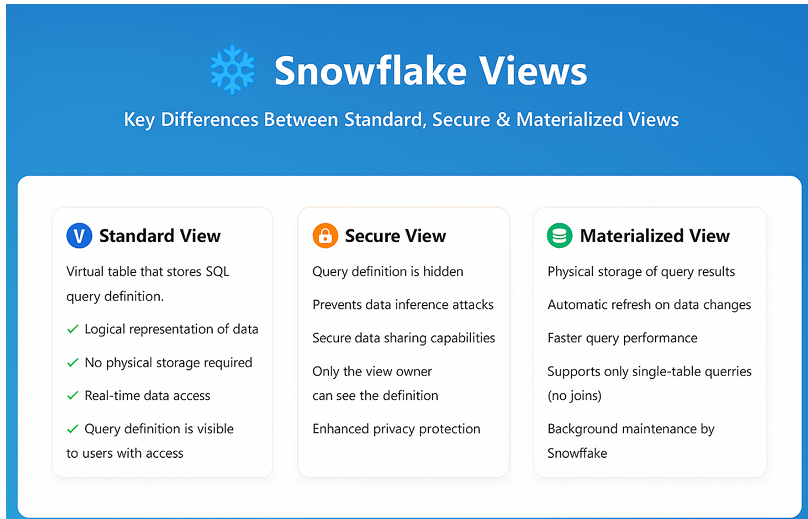
Comparison chart showing features of Standard View, Secure View, and Materialized View.
Views
Views serve as database objects that contain SQL query logic built on top of one or multiple tables. Snowflake supports using views anywhere a table can be referenced, including joins, filters, subqueries, and aggregation.
Key characteristics include:
- A view is a logical representation of data built on one or more tables.
- A view acts like a virtual table and can be used wherever tables are referenced.
- When a view is queried, its underlying SQL executes dynamically and retrieves fresh data.
- Views support combining, segregating, and protecting data access.
- Views are created using a simple SQL definition.
Example view creation:
CREATE OR REPLACE VIEW VIEW_NAME
AS
SELECT statement;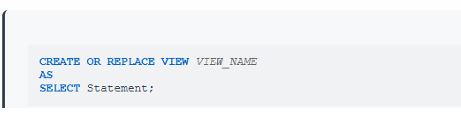
SQL syntax for creating a view
Types of Views
Snowflake provides three types of views:
- Non-materialized views (standard views)
- Secure views
- Materialized views
Secure Views
A secure view restricts users from seeing the underlying SQL definition. It ensures that only authorized users who have been granted the appropriate roles can view or use the data. Secure views are frequently used to protect sensitive logic, implement row-level abstraction, or hide underlying table structures.
Characteristics:
- Secure views prevent users from viewing their SQL definitions.
- Underlying SQL logic is completely hidden.
- Only users with the correct role can access the view.
- Nested secure views help prevent accidental exposure of underlying tables.
- The keyword SECURE must be used during creation.
Example:
CREATE OR REPLACE SECURE VIEW VIEW_NAME
AS
SELECT statement;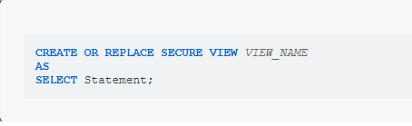
Secure view creation syntax
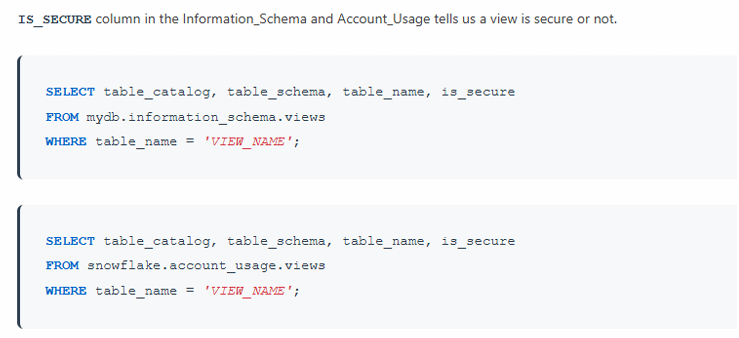
Determining Whether a View Is Secure
Snowflake provides metadata columns to identify secure views. Querying the relevant Information Schema tables reveals whether a view is secure.
SELECT table_catalog, table_schema, table_name, is_secure
FROM INFORMATION_SCHEMA.VIEWS
WHERE table_name = 'VIEW_NAME';
SHOW VIEWS;
Each view is listed with an is_secure column indicating whether it is secure.
How to determine a view is secure view or not?
Materialized Views
A materialized view stores pre-computed results and provides faster query performance compared to standard views. Key properties include:
- A materialized view stores its result set physically.
- Querying a materialized view is often faster because the base table is not scanned.
- Created on a single table only.
- Designed for performance when repeatedly querying the same filtered dataset.
- Available in Snowflake Enterprise Edition or higher.
- Created using the MATERIALIZED keyword.
Example creation:
CREATE OR REPLACE MATERIALIZED VIEW VIEW_NAME
AS
SELECT statement;
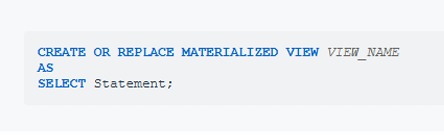
materialized view syntax
Refresh of Materialized Views
Materialized views do not require manual refresh. Snowflake maintains them automatically.
Key points:
- No manual refresh is needed.
- Snowflake performs background maintenance to keep materialized views up to date.
- Refreshing occurs whenever underlying data in the base table changes.
- The background process may take about a minute to refresh results.
Cost of Materialized Views
Materialized views incur two types of costs:
- Storage Cost:
Each materialized view stores query results, which adds to the monthly storage usage for your account. - Compute Cost:
In order to prevent materialized views from becoming out-of-date, Snowflake performs automatic background maintenance of materialized views. When a base table changes, all materialized views defined on the table are updated by a background service that uses compute resources provided by Snowflake. So there will be compute cost associated with it.
When to Create Materialized Views
Guidance for when a materialized view is appropriate:
Create a materialized view when all conditions are true:
- The query results from the base table do not change often.
- The results of the view are reused frequently.
- The query contains large aggregations or requires longer processing time.
- The same filters or conditions are repeatedly applied.
Create a regular view when any of the following are true:
- The results from the base table change often.
- The results are not reused frequently.
- The view is rarely queried.
- The underlying query references multiple tables or complex joins.
Advantages of Materialized Views
- Significant performance improvement for repeated queries.
- No need for additional manual maintenance due to automatic refresh.
- Always delivers updated results as long as the base table is maintained.
Limitations of Materialized Views
- Applicable only to a single base table.
- Does not support joins, including self-joins.
- Does not support aggregate or window functions.
- Materialized views are suspended if the base table is altered or dropped.
- Cannot reference:
- Another materialized view
- A normal view
- A user-defined function (UDF)
Practical Implementation
The final section demonstrates real SQL examples for creating schemas, developing views, querying them, and granting access.
1. Create Schema for Views
CREATE SCHEMA MYVIEWS;
Explanation:
Creates a logical namespace for organizing different views.

creation of MYVIEWS schema
2. Standard View
Use Case
Retrieve contact details of customers from India.
View Creation
// Create customer view
CREATE OR REPLACE VIEW VW_CUSTOMER
AS
SELECT CST.C_CUSTKEY, CST.C_NAME, CST.C_ADDRESS, CST.C_PHONE
FROM SNOWFLAKE_SAMPLE_DATA.TPCH_SF100.CUSTOMER CST
INNER JOIN SNOWFLAKE_SAMPLE_DATA.TPCH_SF100.NATION N
ON CST.C_NATIONKEY = N.N_NATIONKEY
WHERE N.N_NAME = 'INDIA';
This creates a non-secure view tailored to customers in India.
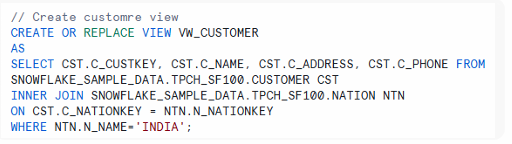
creation of VW_CUSTOMER
Querying the View
SELECT * FROM MYVIEWS.VW_CUSTOMER;
Disable Cached Results
ALTER SESSION SET USE_CACHED_RESULT = FALSE;
Ensures Snowflake re-executes the view for fresh result retrieval.
Grant Access
GRANT USAGE ON DATABASE CUSTOMER TO ROLE PUBLIC;
GRANT USAGE ON SCHEMA CUSTOMER.MYVIEWS TO ROLE PUBLIC;
GRANT SELECT ON VIEW CUSTOMER.MYVIEWS.VW_CUSTOMER TO ROLE PUBLIC;

Section illustrating the process of querying and granting access to the standard view.
3. Secure View
Use Case
Show detailed information of customers in America with restricted exposure of query logic.
Secure View Creation
CREATE SECURE VIEW MYVIEWS.SEC_VW_CUSTOMER
AS
SELECT CST.C_CUSTKEY, CST.C_NAME, CST.C_ADDRESS, CST.C_PHONE,
       N.N_NAME, N.N_REGIONKEY
FROM SNOWFLAKE_SAMPLE_DATA.TPCH_SF100.CUSTOMER CST
INNER JOIN SNOWFLAKE_SAMPLE_DATA.TPCH_SF100.NATION N
ON CST.C_NATIONKEY = N.N_NATIONKEY
WHERE N.N_NAME = 'AMERICA';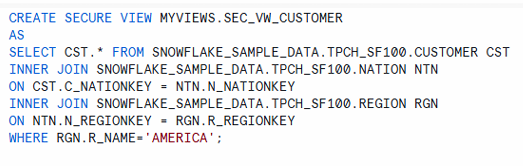
secure view creation(SQL).
Querying the Secure View
SELECT * FROM MYVIEWS.SEC_VW_CUSTOMER;
Grant Access
GRANT USAGE ON DATABASE CUSTOMER TO ROLE PUBLIC;
GRANT USAGE ON SCHEMA CUSTOMER.MYVIEWS TO ROLE PUBLIC;
GRANT SELECT ON VIEW CUSTOMER.MYVIEWS.SEC_VW_CUSTOMER TO ROLE PUBLIC;

secure view usage and grant statements.
Identifying Secure Views
SELECT table_catalog, table_schema, table_name, is_secure
FROM CUSTOMER.INFORMATION_SCHEMA.VIEWS;
Snowflake returns the secure status of each view.

Explanation:
Lists all views with a column is_secure indicating whether a view is secure.
4. Materialized View
Use Case (Invalid Attempt)
Attempting to create a materialized view on a join is not allowed:
CREATE MATERIALIZED VIEW MYVIEWS.MAT_VW_CUSTOMER
AS
SELECT CST.C_CUSTKEY, CST.C_NAME
FROM SNOWFLAKE_SAMPLE_DATA.TPCH_SF100.CUSTOMER CST
INNER JOIN SNOWFLAKE_SAMPLE_DATA.TPCH_SF100.NATION N
ON CST.C_NATIONKEY = N.N_NATIONKEY;
Snowflake does not support joins in materialized views.
Valid Use Case
Requirement: Track high-priority orders.
CREATE MATERIALIZED VIEW MYVIEWS.MAT_VW_ORDERS
AS
SELECT *
FROM SNOWFLAKE_SAMPLE_DATA.TPCH_SF100.ORDERS
WHERE SHIPPING_PRIORITY = 1
AND YEAR(O_ORDERDATE) = 2022
AND MONTH(O_ORDERDATE) = 7;
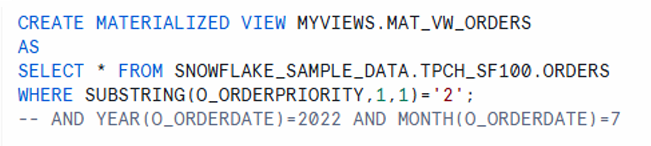
creation of a valid materialized view
Query the Materialized View
SELECT * FROM MYVIEWS.MAT_VW_ORDERS;
Grant Access
GRANT USAGE ON DATABASE CUSTOMER TO ROLE PUBLIC;
GRANT USAGE ON SCHEMA CUSTOMER.MYVIEWS TO ROLE PUBLIC;
GRANT SELECT ON VIEW CUSTOMER.MYVIEWS.MAT_VW_ORDERS TO ROLE PUBLIC;

Materialized view grant access
Monitor Materialized Views
SHOW MATERIALIZED VIEWS;
Check refresh history:
SELECT * FROM TABLE(INFORMATION_SCHEMA.MATERIALIZED_VIEW_REFRESH_HISTORY());
Explanation :
Check when and how often your materialized views were refreshed. Helps in monitoring freshness of data.
Summary:
| View Type | Data Persisted | Can Hide Logic | Supports Joins | Auto-Refresh | Use Case Example |
| Standard View | No | No | Yes | No | Light abstraction on top of table |
| Secure View | No | Yes | Yes | No | Secure customer view for AMERICA |
| Materialized View | Yes | No | No | Yes | High-priority order tracking |
Comparative table summarizing Standard View, Secure View, and Materialized.
Conclusion
Snowflake offers three view types—standard, secure, and materialized—each tailored for different requirements ranging from lightweight abstractions and secure data exposure to optimized query performance. Understanding how each view behaves, when it is suitable, and how it is created provides a clear pathway for designing consistent, protected, and performant data access layers within Snowflake environments.