A complete guide to Snowflake’s role hierarchy, privileges, and access-control framework for managing secure data operations.
Role-Based Access Control (RBAC) in Snowflake
Role-Based Access Control (RBAC) in Snowflake provides a structured mechanism for managing privileges by assigning permissions to roles instead of directly granting them to individual users. This section outlines how Snowflake organizes access control, key concepts involved, role hierarchy, privileges, system-defined roles, and custom role management.
Access Control in Snowflake
Access control determines who can work with database objects and perform operations on them. Snowflake combines two models within its access control framework:
- Discretionary Access Control (DAC): Each object has an owner who can grant access to that object.
- Role-Based Access Control (RBAC): Privileges are assigned to roles, and roles are then assigned to users.
Role Hierarchy Overview
The diagram illustrates how Snowflake organizes roles, beginning with ACCOUNTADMIN at the top, followed by SECURITYADMIN, USERADMIN, and SYSADMIN. Custom roles are typically positioned below SYSADMIN, with PUBLIC at the base of the hierarchy.
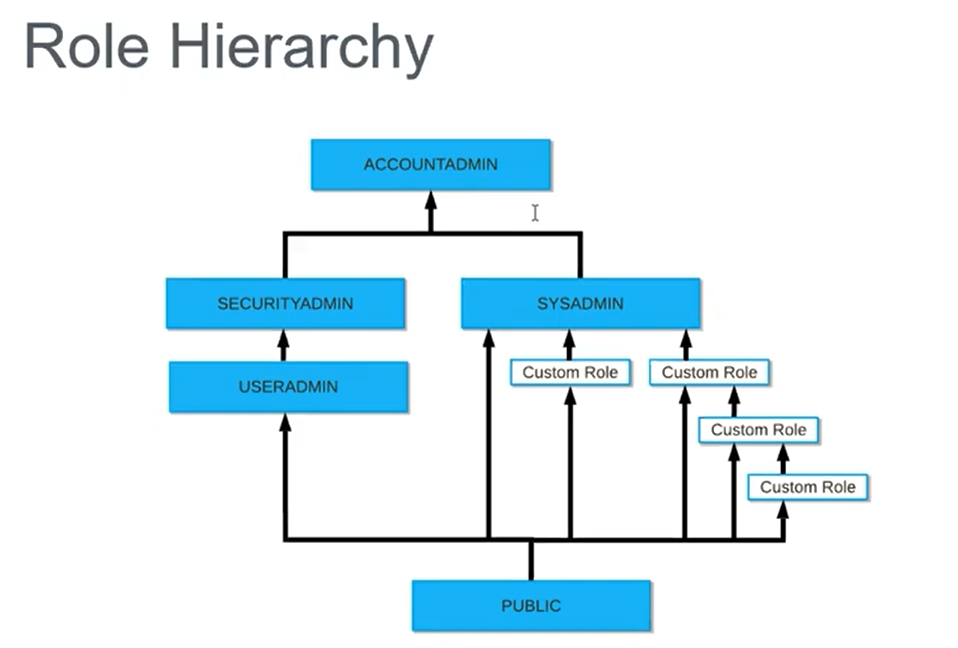
Hierarchical structure showing ACCOUNTADMIN at the top, branching into SECURITYADMIN, USERADMIN, and SYSADMIN, with custom roles arranged beneath SYSADMIN and PUBLIC at the bottom.
A recommended best practice is to assign every custom role to SYSADMIN. This ensures centralized control and simplifies privilege management.
Key Concepts
Snowflake’s access control relies on several foundational concepts:
- Securable object: Any entity to which access can be granted. Examples include tables, schemas, and views.
- Role: The entity to which privileges are granted. Roles may also be assigned to other roles, forming a hierarchy.
- Privilege: A specific level of access granted to an object. Examples include SELECT, CREATE, DROP, and INSERT.
- User: A person or system to whom access is given.
The accompanying visual shows how an owner creates database objects—such as databases, tables, and warehouses—and assigns privileges that propagate to roles and users.
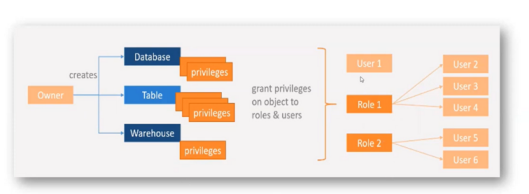
Flow diagram showing database, table, and warehouse objects created by an owner, with privileges granted to roles, which ultimately map to users.
Core Elements of Access Control
- Owner: Responsible for creating objects such as databases, tables, and warehouses.
- Privileges: Assigned by the owner to control operations such as SELECT, INSERT, and USAGE.
- Granting: Privileges may be granted to individual users or roles.
- Role Inheritance: Users inherit privileges through role assignments.
- Centralized Role-Based Control: Access is managed through roles instead of implementing permissions separately for each user.
Summary
Privileges are granted to users or roles on database objects, enabling structured and secure access management within Snowflake.
Privileges
Below is a concise list of commonly used privileges and their usage:
| Privilege | Usage |
|---|---|
| SELECT | Execute a SELECT statement on the table. |
| INSERT | Execute an INSERT query on the table. |
| UPDATE | Execute an UPDATE query on the table. |
| TRUNCATE | Execute a TRUNCATE operation on the table. |
| DELETE | Execute a DELETE operation on the table. |
| ALL [PRIVILEGES] | Grant every privilege except OWNERSHIP. |
| OWNERSHIP | Provide full control over a table, including metadata and privilege reassignment. |
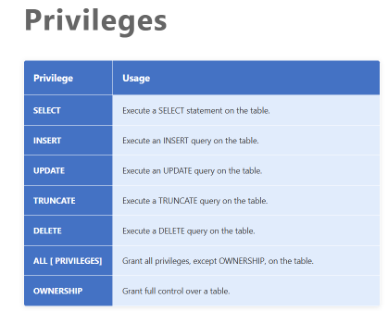
Table listing standard privileges with their corresponding actions.
Object Hierarchy
Snowflake organizes objects in a multi-level hierarchy that begins with the organization and account, then branches into components like users, roles, databases, and warehouses. Under each schema, objects such as tables, views, stages, stored procedures, and UDFs reside.
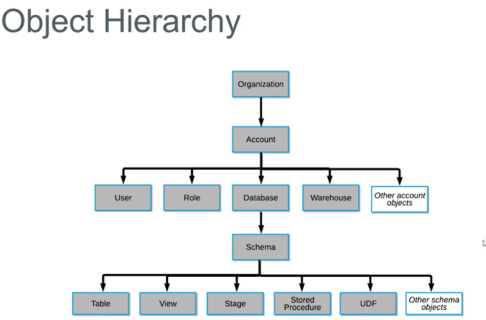
Object hierarchy diagram showing relationships from Organization → Account → User/Role/Database/Warehouse → Schema → Table/View/Stage/Stored Procedure/UDF.]
Roles in Snowflake
Roles define the set of privileges that determine what operations a user can perform. They allow users to execute business functions and manage access in a scalable way. A user may be assigned multiple roles and switch among them as needed.
Snowflake’s web interface shows the active role in the upper-right corner, helping users confirm the role they are currently operating under.
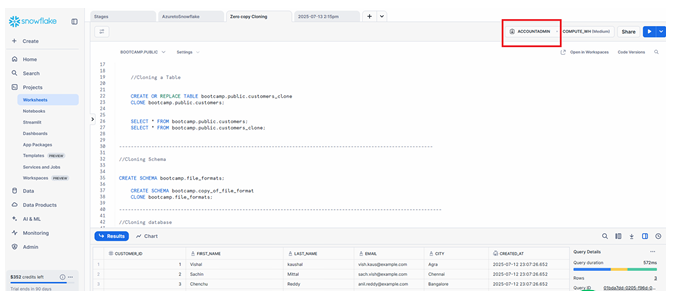
Snowflake interface showing active role highlighted in the top-right corner.
There are two broad categories of roles:
- System-defined roles
- Custom roles
System-Defined Roles
1. ORGADMIN (Organization Administrator)
- Manages operations at the organization level.
- Can create accounts under the organization.
- Views all accounts using SHOW ORGANIZATION ACCOUNTS.
- Views all enabled regions using SHOW REGIONS.
- Monitors usage metrics across the organization.
2. ACCOUNTADMIN (Account Administrator)
- The highest-level role in the account.
- Access to usage, billing, users, roles, sessions, and reader accounts.
- Should be granted sparingly due to its broad capabilities.
- Includes SYSADMIN and SECURITYADMIN privileges.
3. SECURITYADMIN (Security Administrator)
- Manages global object grants.
- Creates, monitors, and manages users and roles.
- Inherits privileges from the USERADMIN role.
- Has limited access to the Account tab.
4. USERADMIN (User and Role Administrator)
- Focused on user and role management.
- Grants CREATE USER and CREATE ROLE privileges.
- Creates users and roles in the account.
5. SYSADMIN (System Administrator)
- Manages warehouses, databases, and other objects.
- Grants privileges on warehouses, databases, and objects to other roles.
- All custom roles should be assigned to SYSADMIN for streamlined management.
6. PUBLIC
- Assigned automatically to every user and every role.
- Objects owned by PUBLIC are accessible to all users.
- Used for universally accessible objects.
Custom Roles
Custom roles allow organizations to design access controls that align with internal requirements.
Key points include:
- Custom roles may be created by USERADMIN or any role granted CREATE ROLE privilege.
- A newly created role is not automatically assigned to users or other roles.
- A hierarchy of custom roles is recommended, with the top role assigned to SYSADMIN.
- Without this association, system administrators may be unable to manage objects owned by custom roles.
- Only SECURITYADMIN can modify access grants when custom roles lack SYSADMIN linkage.
As a best practice whatever the Custom Roles we are creating all those roles must be assigned to SYSADMIN, so that SYSADMIN can controll all these Custom roles.
Role and Privilege Matrix
The matrix presents an example where a customer database contains schemas, tables, privilege sets, and role assignments.
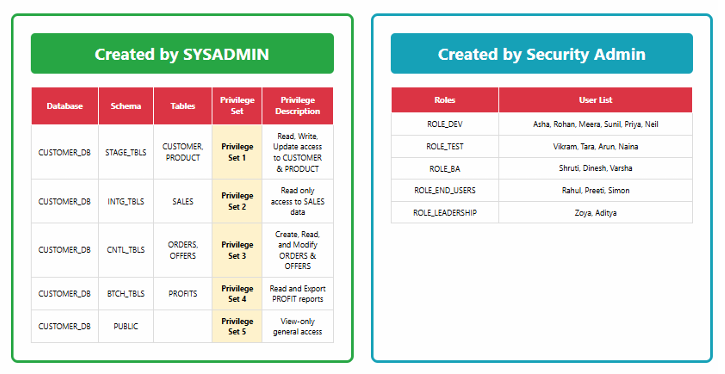
Two-panel matrix showing databases, schemas, tables, and privilege sets on the left, and roles with user lists on the right.
This structure enables organized privilege distribution across teams and ensures consistent access patterns.
Advantages of Using Privileges and Roles
- Users can be added or responsibilities shifted without modifying object-level permissions.
- As teams expand, new roles or privilege sets can be created to accommodate evolving requirements.
Real-World Examples
- When a new business analyst joins, assigning them to ROLE_BA automatically grants the correct access without modifying individual tables.
- During a regulatory audit, access lists for sensitive data can be easily compiled using the role and privilege framework.
Conclusion
Snowflake’s RBAC framework offers a structured, hierarchical model for managing access to database objects. By assigning privileges to roles and roles to users, organizations can efficiently centralize control, simplify user management, and maintain consistent access policies across environments. Adopting recommended practices—including assigning all custom roles to SYSADMIN—ensures administrators retain oversight and flexibility as systems scale.