Snowflake Micro-Partitions: Architecture, Pruning Power, and DML Behavior
A complete technical breakdown of how Snowflake organizes, optimizes, and queries data using micro-partitioning.
1. Introduction
Traditional data warehouses depend heavily on static partitioning—manually defining partitions such as by date, region, or category. While this offers some performance benefits, it also introduces challenges:
- requiring manual design and maintenance
- partitions becoming uneven over time (data skew)
- expensive repartitioning when data distribution changes
Snowflake solves these problems with automatic micro-partitioning, a dynamic partitioning mechanism that adjusts naturally as data is loaded. Unlike static partitioning, Snowflake does not require user-defined partition keys, and micro-partitions adapt continuously based on ingestion order and storage optimization needs.
This difference—static manual partitions vs. dynamic automatic micro-partitions—is central to Snowflake’s architectural advantage.
2. What Are Micro-Partitions?
Micro-partitions are contiguous units of storage created automatically when data is loaded into a Snowflake table. They form the core of how Snowflake organizes and optimizes data.
Key characteristics:
- Each micro-partition stores 50–500 MB uncompressed
- Storage is columnar, enabling independent column scanning
- Each micro-partition contains groups of contiguous rows
- Snowflake creates them automatically—no user partitioning required
- Metadata such as min/max values, distinct counts, and statistics is stored for each partition
This fine-grained structure enables extremely efficient pruning during query execution.
Note:
Micro-partitioning is automatically performed on all Snowflake tables. Tables are transparently partitioned using the ordering of the data as it is inserted/loaded.
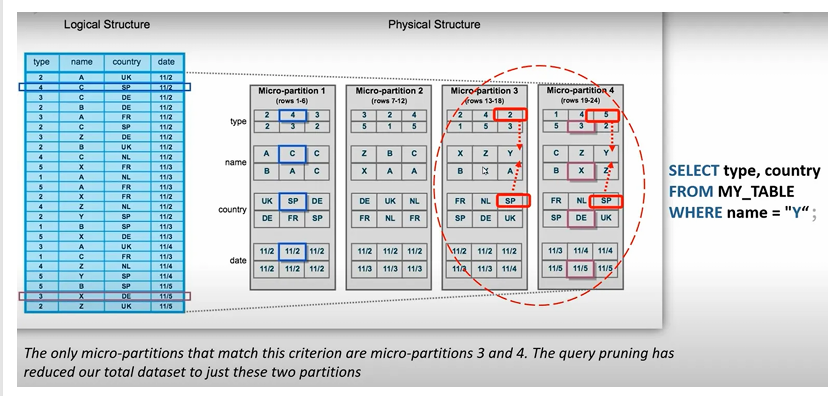
A conceptual visualization of micro-partitions showing contiguous row groups, columnar layout, and metadata boundaries used for pruning.
3. Logical vs. Physical Structure
The logical table you define in SQL — with columns such as type, name, country, date — does not represent how Snowflake physically stores data.
Logical Structure
- Appears as standard relational tables with columns and rows
Physical Structure
- Snowflake breaks the table into many micro-partitions, each storing columnar data for a subset of rows
- Partitions are organized based on load order, not on user-defined grouping
- Each micro-partition stores value ranges, such as:
- name: A–C
- country: IN–US
- date: 2020–2021
This structure is illustrated in above image, where partitions are labeled 1–7, each with distinct min/max ranges for columns.
4. How Query Pruning Works
Query pruning is one of the most powerful outcomes of micro-partitioning.
Example query:
SELECT type, country
FROM MY_TABLE
WHERE name = 'Y';
Snowflake evaluates micro-partition metadata, not the full data, to decide which partitions might contain rows where name = 'Y'.
Pruning Logic
- If a micro-partition’s
namerange is A–M, it cannot contain'Y'→ ignored - If a micro-partition’s
namerange is X–Z, it might contain'Y'→ scanned
Only partitions with overlapping value ranges are accessed.
This significantly reduces I/O, which is why Snowflake queries often return results quickly even on massive datasets.
5. Why Micro-Partitions Matter
Micro-partitions fundamentally change how Snowflake delivers speed and efficiency:
Benefits (Conceptual)
- Faster filtering due to min/max pruning
- Dramatic reduction in scanned data
- Avoids data skew because partitions stay small and uniform
- Better compression at the column level
- Efficient parallel processing due to distribution across partitions
these points emphasize how pruning eliminates unnecessary scans, reducing I/O and improving performance.
6. Benefits of Micro-Partitioning
Direct benefits include:
- Automatic system-driven partitioning (no tuning required)
- Fine-grained micro-level pruning for faster queries
- Prevention of partition skew due to uniform small sizes
- Columnar compression per column inside each partition
- Efficient scanning of only the required columns
- Flexible range overlap allowing better optimization opportunities
These capabilities eliminate the operational burden found in traditional data warehouses.
7. Impact of Micro-Partitions on DML
Snowflake’s micro-partition architecture influences how DML operations behave.
Metadata-driven DML
- DELETE, UPDATE, and MERGE operations rely on metadata changes rather than rewriting entire blocks
- When rows are deleted, Snowflake marks partitions as invalid or updated in metadata but does not rewrite physical data instantly
Dropping a Column
- Dropping a column does not rewrite existing micro-partitions
- Data for the dropped column remains physically present
- It becomes inaccessible because metadata no longer exposes it
This behavior is possible because Snowflake stores immutable micro-partitions and manages updates via metadata layering.
8. Summary
A distilled understanding of micro-partitioning:
- Snowflake divides table data into small chunks called micro-partitions
- Each chunk stores value ranges for columns
- Snowflake uses these ranges to skip irrelevant partitions during query execution
- This reduces scanned data, speeds up filtering, and minimizes cost
- Micro-partitioning is automatic, requiring no manual partitioning strategy
These small, structured partitions are the backbone of Snowflake’s performance advantage.