Snowflake Data Clustering: Architecture, Re-Clustering & Choosing Effective Cluster Keys
A complete technical guide to clustering, pruning efficiency, and optimization strategies.
1. What Is Data Clustering?
Data clustering in Snowflake is the process of organizing micro-partitions along natural dimensions so that similar values are grouped together. This improves pruning efficiency, reduces I/O, and accelerates queries that filter or join on clustered columns.
Clustering does not change the logical structure of the table. Instead, it enhances the physical layout by storing metadata for each micro-partition, describing value ranges for clustering keys.
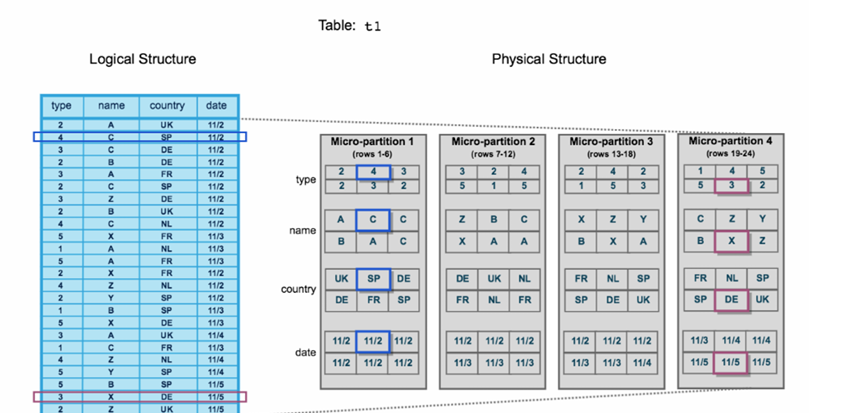
A conceptual clustering diagram showing micro-partitions aligned by a key column, where ranges progress cleanly and similar data resides together.
2. Understanding the Clustering Diagram
The clustering behavior becomes clear when comparing before and after states.
Before Clustering
- Values are scattered randomly across micro-partitions
- Metadata ranges overlap inconsistently
- Snowflake must scan more micro-partitions to answer a filter condition
After Clustering
- Micro-partitions are reorganized to group similar values
- Rows with the same or close values (such as the same name) are colocated
- Snowflake can prune unwanted partitions more aggressively
3. Why Clustering Is Useful
Clustering dramatically improves performance when tables grow large, especially when queries repeatedly filter or join by the same columns.
Before Clustering
- Data is scattered → more micro-partitions scanned
- Higher I/O → slower query performance
- Less effective pruning
After Clustering
- Data is grouped → fewer micro-partitions scanned
- Snowflake prunes with precision
- Faster range queries, equality filters, and joins
This behavior is highlighted through an example where filtering on a frequently used column becomes significantly faster after clustering.
4. Real-World Scenario: When Clustering Helps
Imagine queries frequently filtering on a column like name, date, or country. Without clustering:
- If queries often filter or join on a specific column (here:
name), clustering on that column lets Snowflake “prune” micro-partitions and minimize unnecessary data scanning. - Row values are spread across many partitions
- Each query scans broad ranges
- Cost increases due to unnecessary partition reads
With clustering, Snowflake isolates related values into adjacent micro-partitions—allowing the pruning engine to skip most of the table.
Summary Table
| Before Clustering | After Clustering |
|---|---|
| Data is scattered | Data is organized by name |
| Many partitions scanned | Only needed partitions |
| Slower queries | Faster queries |
| Higher cost (more I/O) | Lower cost (less I/O) |
5. Re-Clustering: How Snowflake Improves Data Layout Over Time
Re-clustering reorganizes existing micro-partitions to align better with selected cluster keys.
Example Scenario
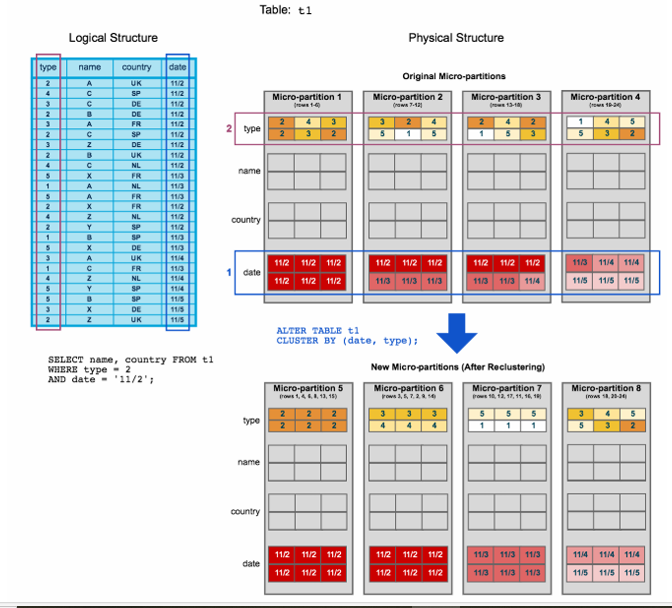
- To start, table t1 is naturally clustered by date across micro-partitions 1-4.
- The query (in the diagram) requires scanning micro-partitions 1, 2, and 3.
- date and type are defined as the clustering key. When the table is reclustered, new micro-partitions (5-8) are created.
- After reclustering, the same query only scans micro-partition 5.
In addition, after reclustering:
- Micro-partition 5 has reached a constant state (i.e. it cannot be improved by reclustering) and is therefore excluded when computing depth and overlap for future maintenance. In a well-clustered large table, most micro-partitions will fall into this category.
- The original micro-partitions (1-4) are marked as deleted, but are not purged from the system; they are retained for Time travel & Fail safe.
The “Constant State” Concept
Some micro-partitions cannot be improved further because:
- their storage distribution already aligns well with the keys
- or they are kept intact for Time Travel and Fail-safe
These partitions are not re-written during re-clustering, reducing maintenance cost while preserving Snowflake’s recovery features.
6. Choosing the Right Cluster Keys
Selecting strong cluster keys is foundational for optimizing Snowflake performance.
When to Use Cluster Keys
Clustering is recommended when:
- a table is large
- queries frequently filter on the same columns
- joins repeatedly use specific dimensions
How to Choose Keys
Choose columns used most often in:
- filter conditions
- join predicates
- range queries
Function-based clustering is also allowed. Examples:
YEAR(date)SUBSTR(code, 3, 5)
Best-Practice Recommendations
- Use clustering only for large tables
- Avoid more than four cluster keys
- Too many keys increase re-clustering cost
- Keep keys aligned with predictable query patterns
7. Summary
Cluster keys improve Snowflake performance by reorganizing micro-partitions along meaningful dimensions. Effective clustering:
- reduces micro-partition scans
- improves pruning
- accelerates filtering and joining
- keeps physical storage aligned with usage patterns
A simple strategy works best: choose keys based on query behavior and keep clustering minimal yet impactful.