Understanding Retention Time in Snowflake: A Complete Guide
Retention Time is one of the most important data-protection features in Snowflake. It directly affects recovery capabilities, Time Travel, cost control, and long-term data governance. Whether you’re preparing for the SnowPro Core exam or building production-grade data pipelines, understanding how retention works at both the table and schema level is essential.
This guide breaks down Retention Time, how it interacts with Time Travel, retention differences across table types, how to alter retention configurations, and how to inspect special table characteristics using the Snowflake UI and SQL commands.
1. What Is Retention Time in Snowflake?
Retention Time is the number of days Snowflake stores historical versions of table data after updates or deletion operations. This retention window is crucial for:
- recovering dropped tables
- restoring previous versions of data
- querying historical records
- enabling safe rollback during pipeline failures
Retention Time powers the Time Travel functionality inside Snowflake, allowing engineers to go back to a specific point in time or before a destructive operation.
1.1 Relationship Between Retention Time and Time Travel
Retention Time directly controls how far back Time Travel can reach. If a table has a retention of 1 day, Time Travel allows access to data from the last 24 hours. If a table has a retention of 30 days, Time Travel supports historical reads for 30 days.
Once the retention period expires:
- Historical micro-partitions are permanently removed
- Time Travel queries for that period become unavailable
Understanding this relationship is key for designing data recovery strategies and maintaining compliance requirements.
1.2 Retention Time for Different Snowflake Table Types
Snowflake offers three core table types that differ in their data-retention behavior.
Permanent Tables
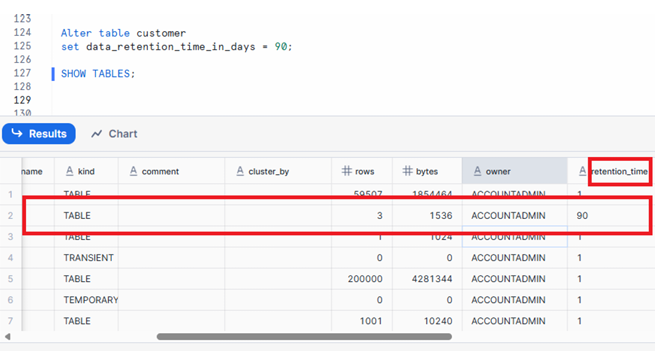
FIG: to Alter Retention Time for permanent table
- Retention range: 0–90 days
- Default retention: 1 day for standard accounts
- Supports both Time Travel and Fail-Safe
- Ideal for production data requiring long-term recoverability
Transient Tables
- Fixed retention: 1 day
- Cannot be increased beyond 1 day
- No Fail-Safe protection
- Designed for staging, transformation, and intermediate ETL workloads
Temporary Tables
- Retention lasts only for the current session
- Dropped automatically when the session ends
- Useful for short-lived transformations, scratch operations, or debugging
Retention Range Summary
| Table Type | Retention Allowed | Default | Fail-Safe |
|---|---|---|---|
| Permanent | 0–90 days | 1 day | Yes |
| Transient | 1 day | 1 day | No |
| Temporary | Session only | Session | No |
Retention Time should be set based on data criticality, compliance rules, and storage considerations.
1.3 Practical Implications of Retention Time
Retention Time affects several operational areas:
Data Recovery
Longer retention increases your ability to recover from accidental deletes, wrong merges, or pipeline failures.
Storage Cost
Historical partitions consume storage. Longer retention means higher cost.
Compliance and Governance
Regulated environments may require minimum retention windows to meet audit requirements.
Business Continuity
Higher retention ensures safety during deployment errors, accidental drops, or system-level issues.
Best Practices
- Use longer retention for production-critical fact and dimension tables
- Keep retention minimal for staging and intermediate tables to reduce cost
- Document retention rules in your data governance framework
- Periodically audit retention settings to ensure they align with business policies
2. Alter Retention Time at the Table Level
Snowflake allows you to modify a table’s retention setting using the ALTER TABLE command.
Example Command
ALTER TABLE customer
SET data_retention_time_in_days = 90;
What Happens When This Command Runs?
- The
customertable retention is updated to 90 days - Time Travel can now access up to 90 days of historical data
- Fail-Safe still applies only if the table is permanent
- Storage usage increases due to additional retained micro-partitions
Checking Retention Using SHOW TABLES
After updating retention, you can view the configuration using:
SHOW TABLES LIKE 'CUSTOMER';
The result includes columns such as:
- name
- table_type
- retention_time
- created_on
Insert your screenshot here.
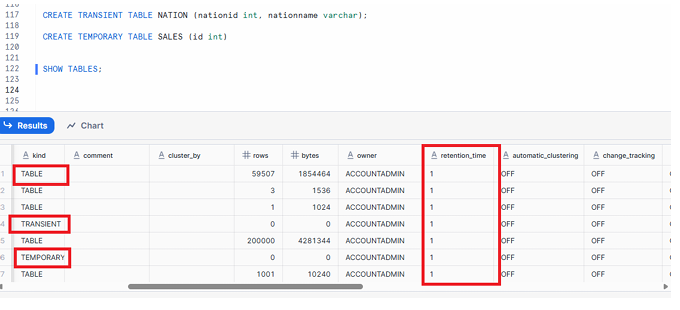
FIG: SHOW TABLES output with retention_time column
3. Alter Retention Time at the Schema Level
Instead of configuring each table individually, Snowflake also supports schema-level retention control. When you set retention at the schema level, all newly created permanent tables inside that schema automatically inherit the specified retention.
Example Command
ALTER SCHEMA RAWLAYER
SET data_retention_time_in_days = 30;
Behavior and Important Notes
- Only newly created permanent tables in the schema inherit the retention setting
- Existing tables remain unchanged
- Transient and temporary tables are unaffected because their retention rules are fixed
- Schema-level retention is useful for ensuring policy compliance without manually altering each table
Best Practices for Schema-Level Retention
- Set schema-level retention in raw and curated layers to ensure consistent protection
- Use descriptive governance documentation to align ingestion zones, staging zones, and production schemas
- Regularly audit schema defaults to ensure they match organizational policies
4. How to Check Whether a Table Is Hybrid, Event, Iceberg, or Dynamic
Snowflake’s ecosystem includes several special-purpose table formats. These can be identified using metadata fields inside the SHOW TABLES command.
How to Inspect the Table Type Using SHOW TABLES
SHOW TABLES;
Then scroll to the right in the result grid in the UI.
You will see metadata flags such as:
is_eventis_hybridis_icebergis_dynamic
What These Attributes Mean
is_event
Indicates if the table is an event table designed for log and telemetry workloads.
is_hybrid
Identifies tables that combine OLTP and OLAP patterns for mixed workloads.
is_iceberg
Marks tables built using the Apache Iceberg format, enabling interoperability with multiple engines.
is_dynamic
Indicates Snowflake Dynamic Tables, which automatically process incremental data based on defined queries.
Why These Metadata Flags Matter
- Helps engineers understand storage format
- Useful for debugging and performance tuning
- Important for identifying eligible features (like incremental refresh or Iceberg-specific behaviors)
- Relevant in multi-engine or lakehouse architectures
Execute command SHOW TABLES & scroll to right
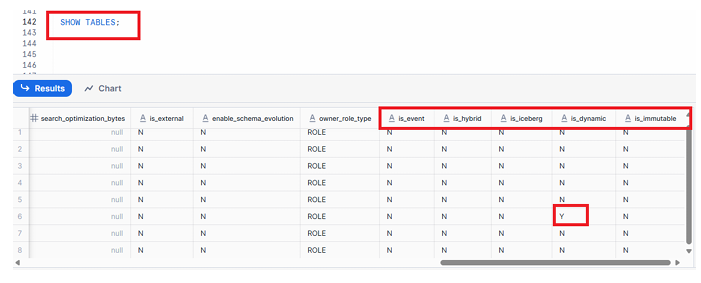
FIG – SHOW TABLES output with event, hybrid, iceberg, dynamic columns
Conclusion
Retention Time plays a vital role in Snowflake’s data protection and recovery framework. Knowing how to configure it at the table and schema level helps data engineers balance governance, cost, and operational safety. Understanding metadata flags for table types further enhances your ability to build modern, scalable Snowflake architectures.
This guide provides the foundational knowledge necessary for SnowPro Core exam preparation and equips you with practical skills to manage production Snowflake environments. If you continue mastering topics like Time Travel, Fail-Safe, and table lifecycle management, you’ll be well on your way to becoming a Snowflake expert.