

Incremental Load in Snowflake Using S3, Snowpipe, Streams, and Tasks
Incremental Load
Incremental load is the process of loading only new or changed data instead of reloading the entire dataset every time.
This approach improves performance, reduces cost, and ensures data freshness in downstream tables.
The incremental load pipeline implemented here follows this flow:
- Amazon S3
- Snowpipe (auto ingestion)
- Streams (change data capture)
- Tasks (automation)
- Silver Table (clean layer)
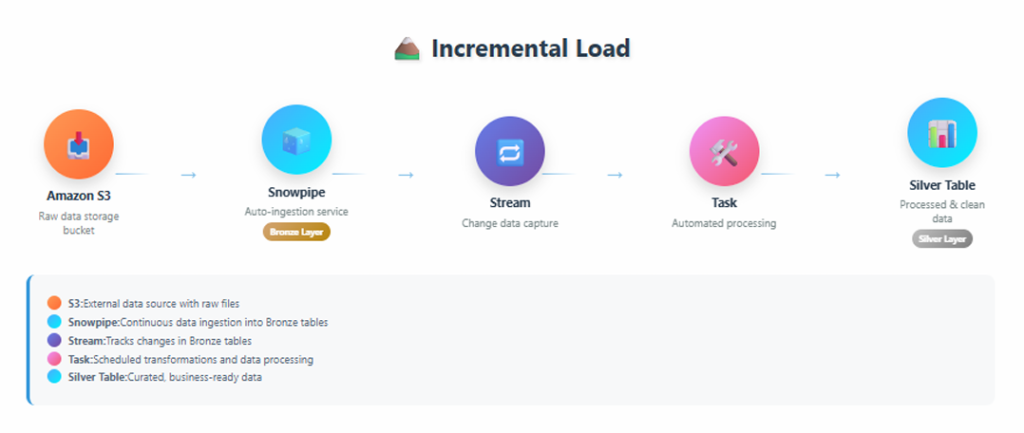
End-to-end incremental load architecture showing S3, Snowpipe, Streams, Tasks, and Silver Table
Step 1: Create Database & Schema
CREATE DATABASE ecomproject;
CREATE SCHEMA ecomproject.sales;
This database and schema will be used to create all required objects for the incremental load pipeline.
Step 2: Define File Format for CSV
CREATE OR REPLACE FILE FORMAT csv_format_employees
TYPE = 'CSV'
FIELD_DELIMITER = ','
SKIP_HEADER = 1
FIELD_OPTIONALLY_ENCLOSED_BY = '"'
EMPTY_FIELD_AS_NULL = TRUE
NULL_IF = ('\\N', 'NULL', '')
ENCODING = 'UTF8';
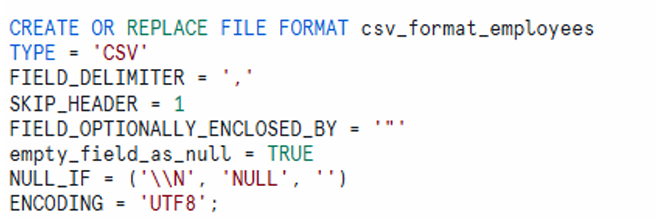
This file format definition ensures that CSV data from S3 is parsed correctly during ingestion.
Step 3: Create Storage Integration with AWS S3
CREATE OR REPLACE STORAGE INTEGRATION s3_integration
TYPE = EXTERNAL_STAGE
ENABLED = TRUE
STORAGE_PROVIDER = 'S3'
STORAGE_AWS_ROLE_ARN = 'arn:aws:iam::xxxxxxxxxxxx:role/aws_snowflake_role'
STORAGE_ALLOWED_LOCATIONS = (
  's3://e-commerce-project-id-01/bronze/',
  's3://e-commerce-project-id-01/silver/'
);
The storage integration enables secure access between Snowflake and AWS S3 without using access keys.
Step 4: Create External Stage Object Using Storage Integration
CREATE OR REPLACE STAGE external_stages
STORAGE_INTEGRATION = s3_integration
URL = 's3://e-commerce-project-id-01/bronze'
FILE_FORMAT = csv_format_employees;
The external stage points to the S3 location where raw CSV files are uploaded.
Step 5: Create Raw Table (Bronze Layer)
CREATE OR REPLACE TABLE ecomproject.sales.employees_raw (
  EMPID INT,
  EMPNAME VARCHAR(30),
  SALARY FLOAT,
  AGE INT,
  DEPT VARCHAR(15),
  LOCATION VARCHAR(20)
);
The raw table stores data exactly as received from the source without any transformation.
Step 6: Create Snowpipe for Auto Ingestion
CREATE OR REPLACE PIPE raw_employees_data_pipe
AUTO_INGEST = TRUE
AS
COPY INTO ecomproject.sales.employees_raw
FROM @external_stages
ON_ERROR = CONTINUE
FILE_FORMAT = (FORMAT_NAME = 'csv_format_employees');
Snowpipe automatically loads files from S3 into the raw table as soon as new files arrive.
To monitor the Snowpipe status:
SELECT SYSTEM$PIPE_STATUS('raw_employees_data_pipe');
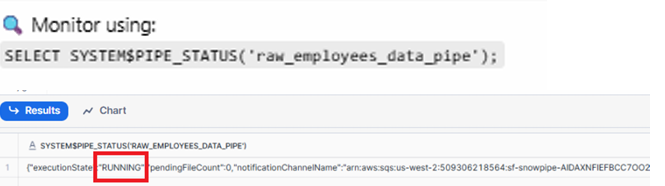
Pipe status output showing execution state as RUNNING
Step 7: Create Stream on Bronze Table
CREATE OR REPLACE STREAM ecomproject.sales.raw_employees_data_streams
ON TABLE ecomproject.sales.employees_raw
SHOW_INITIAL_ROWS = TRUE;
The stream captures row-level changes from the raw table and enables incremental processing.
Upload employees1.csv File into AWS S3
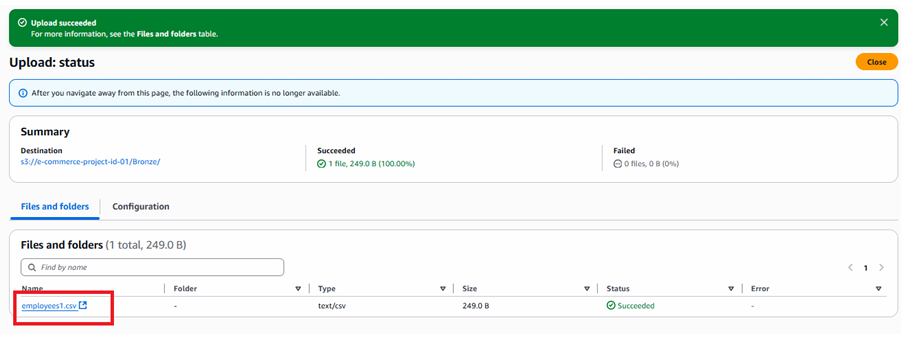
After uploading employees1.csv to the S3 bucket, Snowpipe automatically ingests the data.
SELECT *
FROM ecomproject.sales.employees_raw;

As shown, Snowpipe fetched 6 records from the employees1.csv file using streams from S3.
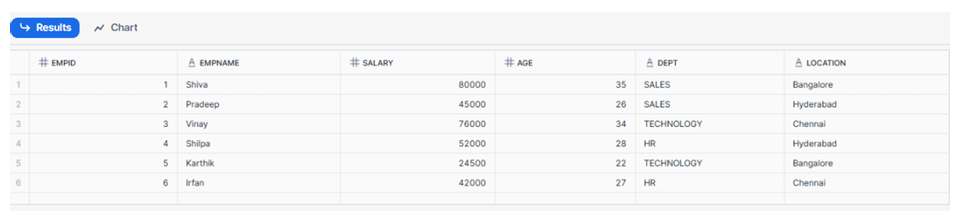
Raw table output showing 6 records loaded from employees1.csv
As shown above Snowpipe has fetched 6 records using streams from employees1 file from S3.
Step 8: Create Silver Table (Clean Layer)
CREATE OR REPLACE TABLE ecomproject.sales.employees_silver (
  EMPID INT,
  EMPNAME VARCHAR(30),
  SALARY FLOAT,
  AGE INT,
  DEPT VARCHAR(15),
  LOCATION VARCHAR(20)
);
The silver table stores cleaned and deduplicated data.
Step 9: Create Task and Merge Statement for Incremental Load into Silver Table (SCD Type 1)
CREATE OR REPLACE TASK ecomproject.sales.task_incremental_load
WAREHOUSE = COMPUTE_WH
SCHEDULE = '1 MINUTE'
AS
MERGE INTO ecomproject.sales.employees_silver T
USING ecomproject.sales.raw_employees_data_streams S
ON T.EMPID = S.EMPID
WHEN MATCHED
  AND S.METADATA$ACTION = 'DELETE'
  AND S.METADATA$ISUPDATE = 'FALSE'
THEN DELETE
WHEN MATCHED
  AND S.METADATA$ACTION = 'INSERT'
  AND S.METADATA$ISUPDATE = 'TRUE'
THEN UPDATE SET
  T.EMPNAME = S.EMPNAME,
  T.SALARY = S.SALARY,
  T.AGE = S.AGE,
  T.DEPT = S.DEPT,
  T.LOCATION = S.LOCATION
WHEN NOT MATCHED
  AND S.METADATA$ACTION = 'INSERT'
  AND S.METADATA$ISUPDATE = 'FALSE'
THEN INSERT (EMPID, EMPNAME, SALARY, AGE, DEPT, LOCATION)
VALUES (S.EMPID, S.EMPNAME, S.SALARY, S.AGE, S.DEPT, S.LOCATION);
This merge logic implements incremental load with duplicate handling using stream metadata.
Check the Status of Task
DESC TASK ecomproject.sales.task_incremental_load;

As shown, the task is initially in a SUSPENDED state.
To enable it:
ALTER TASK ecomproject.sales.task_incremental_load RESUME;
After resuming, the task status changes to STARTED.

As you can see above task is STARTED
SELECT *
FROM ecomproject.sales.employees_silver;

As shown, 6 records have been fetched from the raw table and copied to the silver table.
Step 10: Let us check Incremental load logic created in STEP-09
employees2.csv
Now upload employees2.csv into the AWS S3 bucket.
This file contains 11 records, including duplicates already present from employees1.csv.
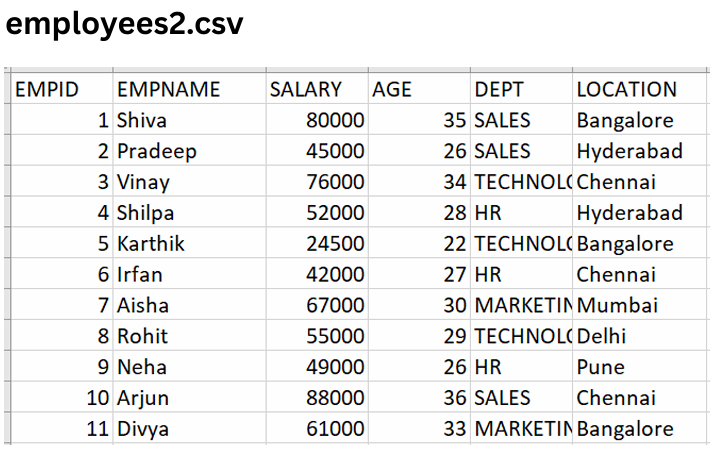
employees2.csv file preview showing 11 records
Check Raw Table After Upload
SELECT *
FROM ecomproject.sales.employees_raw;
As shown, the raw table now contains 17 records, including duplicate records.
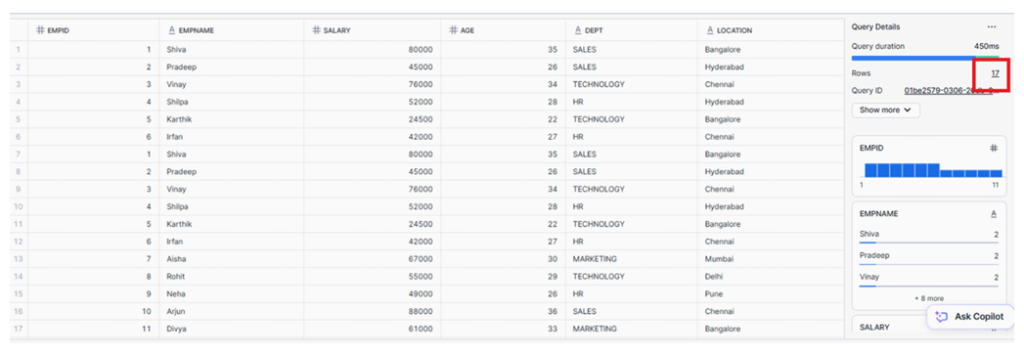
Raw table showing total of 17 records
Check Silver Table After Incremental Load
SELECT *
FROM ecomproject.sales.employees_silver
ORDER BY EMPID;
As shown, the silver table contains only 11 records.
Explanation:
- Out of 11 records in
employees2.csv, 5 records are new - 6 records are duplicates already loaded from
employees1.csv - Duplicate records were skipped during the incremental merge
Result:
Only the 5 new records were inserted, resulting in 11 distinct records in the silver table.
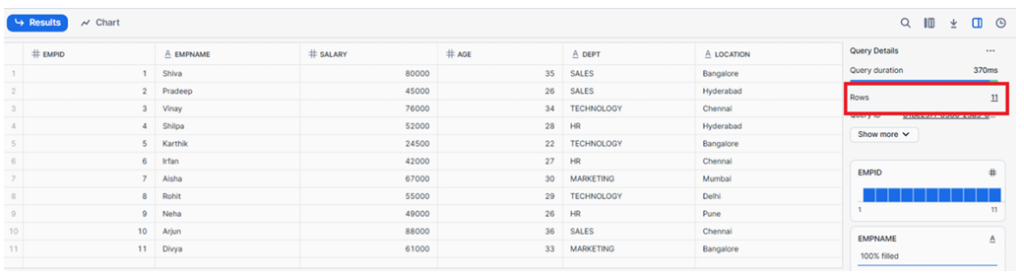
Silver table output showing 11 distinct records
Out of the 11 records in employees2.csv, only 5 were new records, while the remaining 6 were duplicates of records already loaded earlier from employees1.csv.
Since those 6 duplicate records were already present in the Silver table, they were skipped during the incremental load.
✅ Result:
Only the 5 new records from employees2.csv were inserted, resulting in a total of 11 distinct records in the Silver table.
Now let us test UPDATE statement by updating salary of empid -1 from 80,000 to 90,000
Testing UPDATE Statement
Now test the update logic by updating salary for EMPID = 1 from 80,000 to 90,000.
UPDATE ecomproject.sales.employees_silver
SET SALARY = 90000
WHERE EMPID = 1;
SELECT *
FROM ecomproject.sales.employees_silver
ORDER BY EMPID;
As shown, the salary for EMPID = 1 has been successfully updated.
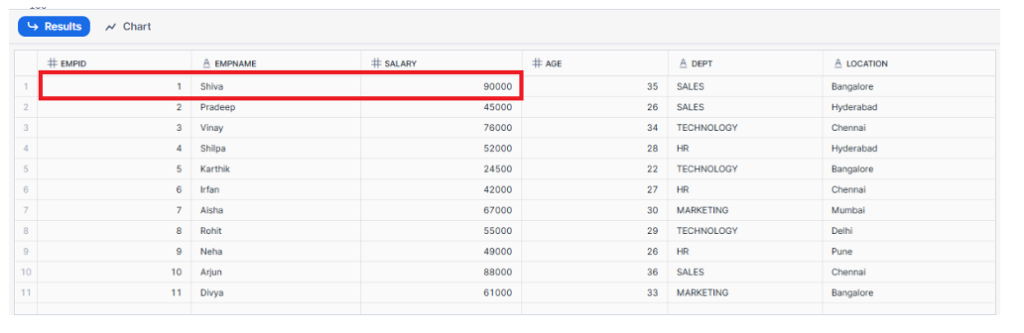
Silver table showing updated salary value
Congratulations we have implemented end to end Incremental load logic using Merge statement, Snowpipe, Streams and tasks and also tested using insert and updating records(UPSERT).
Completion
Incremental load logic has been successfully implemented end-to-end using:
- Merge statement
- Snowpipe
- Streams
- Tasks
The pipeline has been tested using both insert and update operations (UPSERT).
If practicing using a Snowflake free account, suspend the task after completion:
ALTER TASK ecomproject.sales.task_incremental_load SUSPEND;
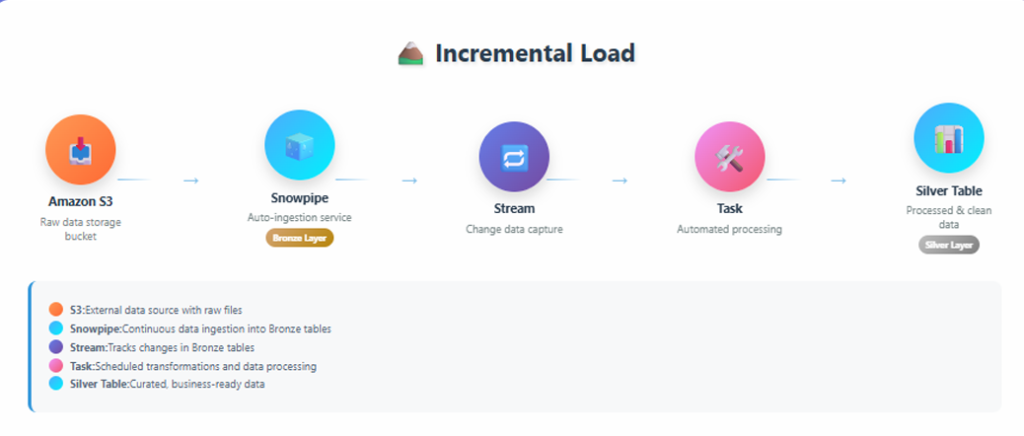
Incremental load architecture showing S3 → Snowpipe → Stream → Task → Silver Table