

Snowflake Streams – A Deep Dive into Change Data Capture (CDC)
A Deep Dive into Change Data Capture (CDC)
What is a Stream?
A stream object records DML changes made to tables including inserts, updates, and deletes.
Also, a stream stores metadata about each change, so that actions can be taken using this metadata.
We call this process as change data capture (CDC).
Streams track all row-level changes to a source table using offset but don’t store the changed data.
Once these changes are consumed by the target table, this offset moves to the next point.
Streams can be combined with tasks to set continuous data pipelines.
Snowpipe + Stream + Task → Continuous Data Load
Why Use Streams?
- For incremental loads
- Building CDC pipelines
- Auditing table changes
- Triggering downstream tasks
Metadata of Streams
Along with the changes made to the source table, streams maintain three metadata fields.
1. METADATA$ACTION
Indicates the DML operation (INSERT, DELETE) recorded.
2. METADATA$ISUPDATE
Indicates whether the operation was part of an UPDATE statement.
Updates to rows in the source object are represented as a pair of DELETE and INSERT records in the stream with a metadata column METADATA$ISUPDATE values set to TRUE.
3. METADATA$ROW_ID
Specifies the unique and immutable ID for the row, which can be used to track changes to specific rows over time.
Very Important
Streams Visuals
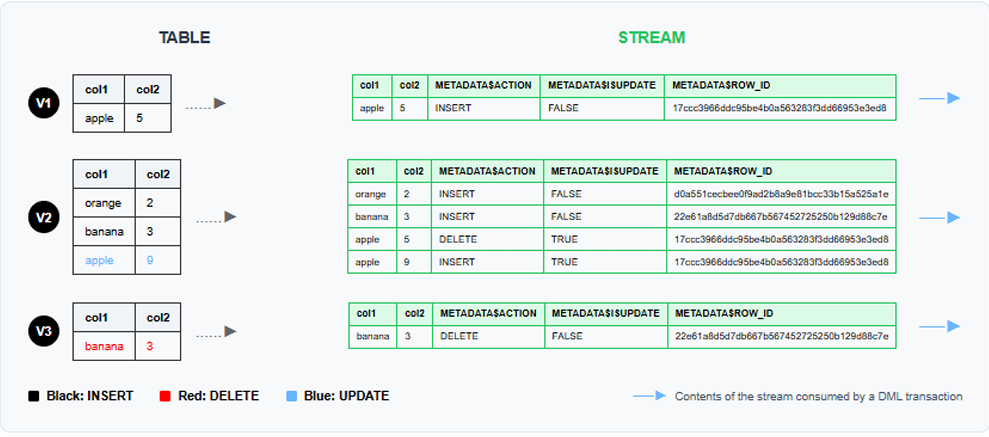
TABLE versions (V1, V2, V3) on the left and corresponding STREAM records on the right with color legend
Legend (as shown in image):
- Black: INSERT
- Red: DELETE
- Blue: UPDATE
Note shown in image:
Contents of the stream consumed by a DML transaction.
How it Works
Version 1 (V1):
Initial table contains one row: apple with value 5.
The stream captures this as an INSERT operation with METADATA$ISUPDATE = FALSE.
Version 2 (V2):
Three operations occurred:
- INSERT orange (2)
- INSERT banana (3)
- UPDATE apple from 5 to 9
Notice how the UPDATE is represented as a DELETE–INSERT pair with METADATA$ISUPDATE = TRUE for both operations, sharing the same ROW_ID.
Version 3 (V3):
The banana row was DELETED from the table.
The stream captures this as a DELETE operation with METADATA$ISUPDATE = FALSE, indicating it’s a standalone delete, not part of an update.
More Detailed Explanation
Understanding Snowflake Streams: Data Flow Simplified
Streams in Snowflake track changes (INSERTs, UPDATEs, DELETEs) made to a table so that these changes can be consumed later for downstream processing.
Think of a stream like a CDC (Change Data Capture) mechanism.
Data Flow Breakdown – Version by Version
v1: Initial Table State
Table Data:
- (apple, 5) inserted (black text = INSERT)
Stream Captures:
- Row: (apple, 5)
- METADATA$ACTION: INSERT
- METADATA$ISUPDATE: FALSE
- METADATA$ROW_ID: Unique identifier for this row
v2: Table Updates
Changes in Table:
- New rows inserted: (orange, 2) and (banana, 3)
- Row (apple, 5) updated to (apple, 9)
- This is treated as DELETE old + INSERT new
Stream Captures:
- (orange, 2): INSERT, ISUPDATE = FALSE
- (banana, 3): INSERT, ISUPDATE = FALSE
- (apple, 5): DELETE, ISUPDATE = TRUE
- (apple, 9): INSERT, ISUPDATE = TRUE
Important note shown:
Updates in Snowflake Streams are split into a DELETE and an INSERT operation, both sharing the same ROW_ID.
v3: More Changes
Changes in Table:
- Row (banana, 3) is deleted.
Stream Captures:
- (banana, 3): DELETE, ISUPDATE = FALSE
Key Concepts to Remember
| Term | Meaning |
|---|---|
| METADATA$ACTION | Operation type: INSERT, DELETE |
| METADATA$ISUPDATE | TRUE if part of an update (delete + insert), otherwise FALSE |
| METADATA$ROW_ID | Unique row identifier, helps track changes especially in UPDATEs |
listing key stream metadata concepts
Stream Consumption
Once the stream data is read by a DML transaction (e.g., a MERGE or INSERT INTO), the changes are consumed and won’t appear again unless newer changes occur.
Still not clear, let me explain with example
In Snowflake Streams:
METADATA$ISUPDATE:
- TRUE – if the change is part of an UPDATE operation
- (i.e., the system performs a DELETE of the old row and an INSERT of the new row)
- FALSE – for a pure INSERT or DELETE operation that is not part of an UPDATE
Example:
If you update apple, 5 → apple, 9, the stream shows:
- DELETE for (apple, 5) with ISUPDATE = TRUE
- INSERT for (apple, 9) with ISUPDATE = TRUE
If you just insert banana, 3, the stream shows:
- INSERT with ISUPDATE = FALSE
If you just delete banana, 3, the stream shows:
- DELETE with ISUPDATE = FALSE
Types of Streams
1. Standard Streams
A standard stream tracks all DML changes to the source object, including inserts, updates, and deletes (including table truncates).
CREATE OR REPLACE STREAM my_stream ON TABLE my_table;
2. Append-only Streams
An append-only stream tracks row inserts only.
Update and delete operations (including table truncates) are not recorded.
CREATE OR REPLACE STREAM my_stream ON TABLE my_table
APPEND_ONLY = TRUE;
3. Insert-only Streams
Supported for External tables only.
An insert-only stream tracks row inserts only.
They do not record delete operations.
CREATE OR REPLACE STREAM my_stream ON EXTERNAL TABLE my_table
INSERT_ONLY = TRUE;

Explore In Next Part
In next part using tasks and streams we will implement incremental load practically.